


How to Determine Your TP-Link Range Extender's Working Status via the LED Lights
The LED lights on a TP-Link range extender provide useful information about its working status. Understanding the TP-Link Wi-Fi extender lights' meaning helps you confirm whether the setup was successful and whether your extender is placed in a good location. This guide explains how to read two types of indicators — the RE/WPS light and the Signal lights — in two scenarios: during WPS setup and after the extender has been configured. Note that LED behavior may vary slightly by model.
Key Takeaways
- TP-Link range extenders have two types of LED indicators: the RE/WPS light, which indicates the WPS pairing process, and the Signal lights, which indicate whether the extender is successfully connected to the router.
- During WPS setup, the RE light will blink while pairing is in progress. When it turns solid on, WPS has connected successfully.
- Once the range extender is configured, check the Signal lights to confirm the connection. If any Signal light is solid on, regardless of color or number of bars, the extender is connected to the router.
- The color and number of Signal lights indicate the signal strength the extender receives from the main router. Use this to find the best placement location for your extender.
- RE light behavior varies by model. For example, the TL-WA850RE keeps the RE light solid on after setup, while the RE200's RE light turns off after two minutes.
Part A: Understanding the RE/WPS Indicator Light During Setup
During the WPS process, watch the RE light — it should change from blinking to solid, confirming a successful WPS connection.
Below is the WPS/RE LED of TL-WA850RE and RE200:
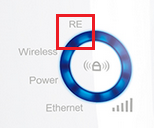
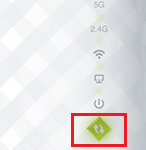
Fail to connect the router via WPS
Note: Different Range Extenders may behave differently on the RE light. For example, the RE/WPS LED on TL-WA850RE will remain solid “on” after a successful configuration, while RE200’s RE LED will only stay “on” for 2 minutes before turning off. For the most reliable indication of your range extender's working status, check the Signal lights.
Part B: Checking the Signal Lights After Configuration
The Signal lights will give you the exact information that you have configured your Range Extender successfully. Once the range extender is connected to the router, the Signal light will be solid on — regardless of color or number of bars.
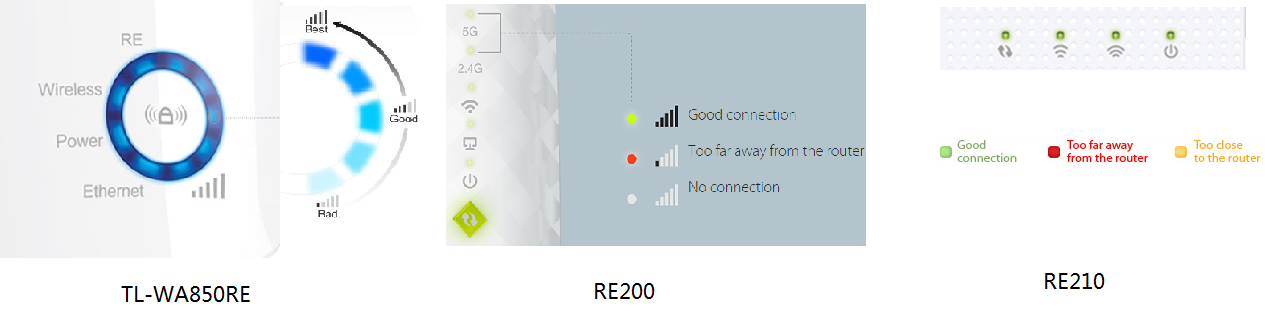
The color and number of Signal lights indicate the signal strength the extender receives from the main router — use this to find the best placement for your extender.
Conclusion
- First, the RE light on the Range Extender is used only to indicate the WPS process. After you press the Range Extender’s RE/WPS button, the RE light will start blinking. After several minutes, if the RE light stays solid, it means the WPS process is successful.
- Second, the Range Extender's signal lights will indicate whether it has successfully connected to the wireless router. So in most cases, you just need to check the RE’s Signal lights to see if you have successfully configured your Range Extender.
Get to know more details of each function and configuration please go to Download Center to download the manual of your product.
¿Es útil esta pregunta frecuente?
Sus comentarios nos ayudan a mejorar este sitio.

.jpg)

TP-Link Community
Still need help? Search for answers, ask questions, and get help from TP-Link experts and other users around the world.