What should I do if I don’t receive the verification email for TP-Link ID registration or password reset?
Introduction
If you don’t receive the verification email when registering for a TP-Link ID or resetting your password, it may be due to your email provider blocking TP-Link messages or your domain’s SMTP server restricting delivery based on its SPF (Sender Policy Framework) settings. SPF helps verify a sender’s IP to reduce spam, and TP-Link’s SPF configuration is compatible with most major email providers. This FAQ explains the common causes and offers practical steps to help you receive the email successfully.
Troubleshooting
Step 1. Check Inbox Storage
Make sure your TP-Link ID email inbox is not full. A full mailbox can block new messages, including TP-Link verification or password‑reset emails. Delete unneeded emails or files to free up space.
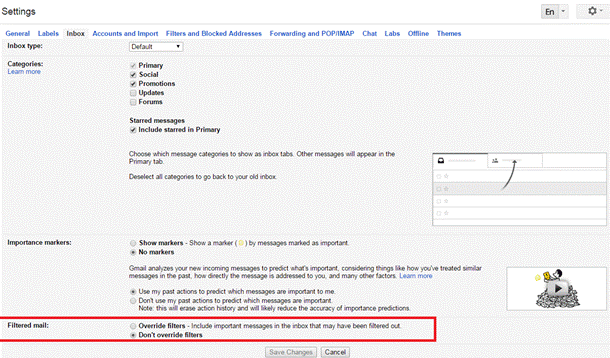
Step 2. Check Email Filter Settings
Review your TP-Link ID email filter and spam settings, and confirm that no-reply@email.tp-link.com is not filtered out (The picture below uses Gmail as an example).
Step 3. Add TP-Link to Allow list
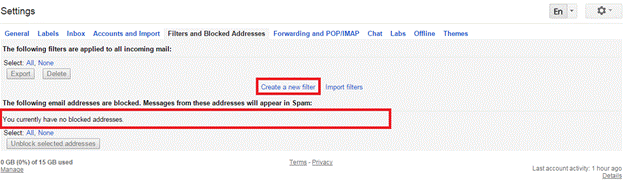
Add no-reply@email.tp-link.com to the White list by creating a new filter in your email settings.
In the Gmail Filters and Blocked Addressed setting page, you can also view the blocked email addresses of your account.
Step 4. Check Email Domain Type and Register a New TP-Link ID if needed
Some domains used by small businesses, medical, educational, or government institutions may have strict security policies that block automated emails. These domains are not recommended for TP-Link ID registration.
If possible, sign up for a new TP-Link ID using a major email provider, such as Gmail or Yahoo Mail.
Get to know more details of each function and configuration, please go to Download Center to download the manual of your product.
Is this faq useful?
Your feedback helps improve this site.
What’s your concern with this article?
- Dissatisfied with product
- Too Complicated
- Confusing Title
- Does not apply to me
- Too Vague
- Other
Thank you
We appreciate your feedback.
Click here to contact TP-Link technical support.
Recommend Products
This Article Applies to:
- ER706W-4G
- ER706WP-4G
- SG2005P-PD
- SG2008
- SG2008P
- SG2016P
- SG2206MP
- SG2210MP
- SG2210P
- SG2218
- SG2218P
- SG2428P
- SG2452LP
- SG3428
- SG3428MP
- SG3452
- SG3452P
- SX3206HPP
- SX3832
- SX3832MPP
- SG3428XMPP
- SG3452X
- SG3452XMPP
- SG5428X
- SG5428XMPP
- SG5452X
- SG5452XMPP
- SG6428X
- SG6428XHP
- SG6654X
- SG6654XHP
- SG2210XMP-M2
- SG3210X-M2
- SG3210XHP-M2
- SG3218XP-M2
- SG3428X
- SG3428X-M2
- SG3428XPP-M2
- SG3428XF
- SG5428XF
- SX3008F
- SX3016F
- SX3032F
- SX6632YF
- ES205G
- ES205GP
- ES206GP
- ES206X-M2
- ES206XPP-M2
- ES208G
- ES208GP
- ES210GMP
- ES210GP
- ES210X-M2
- ES210XPP-M2
- ES216G
- ES220GMP
- ES220GP
- ES224G
- ES228GMP
- ES228GP
- Archer A6
- Archer AX10
- Archer AX23
- Archer AX53
- Archer AX55
- Archer AX57
- Archer AX72 Pro
- Archer AX73
- Archer AXE75
- Archer BE220
- Archer BE225
- Archer BE400
- Archer BE550
- Archer BE550 Pro
- Archer BE600
- Archer BE6500
- Archer BE700
- Archer BE800
- Archer BE900
- Archer C20
- Archer C50
- Archer C80
- Archer GE230
- Archer GE400
- Archer GE550
- Archer GE800
- TL-WR1502X
- TL-WR1512X
- TL-WR3002X
- TL-WR3602BE
- TL-WR5002BE
- TL-WR802N
- TL-WR841N
- TL-WR902AC
- AP9670
- EAP225
- EAP245
- EAP610
- EAP620 HD
- EAP650
- EAP653
- EAP660 HD
- EAP670
- EAP673
- EAP720
- EAP723
- EAP770
- EAP772
- EAP773
- EAP783
- EAP787
- Omada Central
- Omada Central Essentials
- Omada Cloud Essentials
- Omada Cloud-Based Controller
- Deco BE22
- Deco BE25
- Deco BE25-Outdoor
- Deco BE65
- Deco BE65 Pro
- Deco BE65-PoE
- Deco BE68
- Deco BE75
- Deco BE77
- Deco BE85
- Deco BE95
- Deco M4
- Deco X10
- Deco X20
- Deco X50
- Deco X50 Pro
- Deco X50-Outdoor
- Deco X50-PoE
- Deco X55
- Deco X95
- Deco XE75
- Deco XE75 Pro
- EAP650-Desktop
- EAP615GP-Wall
- EAP650GP-Desktop
- OC200
- OC220
- OC300
- OC400
- IES206G
- IES206GPP
- IES208G
- IES210GPP
- TL-SG3452X
- TL-SX3016F
- OC200
- OC300
- M8550
- EAP225-Outdoor
- EAP610-Outdoor
- EAP625-Outdoor HD
- EAP650 D120-Outdoor
- EAP650 D30-Outdoor
- EAP650-Outdoor
- EAP668-Outdoor HD
- EAP725-Outdoor
- EAP772-Outdoor
- EAP775-Outdoor
- SG3218XP-M2
- TL-SG3452P
- TL-SX3206HPP
- TL-PA7017 KIT
- TL-PA7017P KIT
- TL-PA9020P KIT
- TL-WPA7517 KIT
- Archer Air E5
- Archer Air R5
- RE215
- RE220
- RE225BE
- RE235BE
- RE300
- RE315
- RE405BE
- RE450
- RE505X
- RE515X
- RE550
- RE600X
- RE605X
- RE650
- RE655BE
- RE705X
- RE715X
- RE765X
- RE815XE
- TL-WA850RE
- Tapo RVA100
- Tapo RVA200
- Tapo RVA300
- Tapo RVA400
- Tapo RV10 Plus
- Tapo RV20 Max Plus
- Tapo RV30 Max Plus
- Tapo RV50 Pro Omni
- Tapo A100
- Tapo A200
- Tapo C100
- Tapo C110
- Tapo C113
- Tapo C120
- Tapo C200
- Tapo C210
- Tapo C210P2
- Tapo C216
- Tapo C225
- Tapo C230
- Tapo C245D
- Tapo C246D
- Tapo C250
- Tapo C260
- Tapo C310
- Tapo C320WS
- Tapo C325WB
- Tapo C400
- Tapo C400 KIT
- Tapo C410
- Tapo C410 KIT
- Tapo C420
- Tapo C425
- Tapo C425 KIT
- Tapo C460
- Tapo C460 KIT
- Tapo C465
- Tapo C500
- Tapo C510W
- Tapo C520WS
- Tapo C530WS
- Tapo C545D
- Tapo C560WS
- Tapo C575D
- Tapo C610 KIT
- Tapo C615F KIT
- Tapo C630 KIT
- Tapo C645D KIT
- Tapo C660 KIT
- Tapo C675D KIT
- Tapo C710
- Tapo C840
- Tapo D130
- Tapo D210
- Tapo D235
- Tapo DL100
- Tapo DL105
- Tapo DL110
- Tapo DL130
- Tapo H100
- Tapo H200
- Tapo H500
- KL125
- KL135
- Tapo L530E
- Tapo L535E
- Tapo L900-20
- HS103P2
- HS200P3
- KP125MP2
- KP125MP4
- KP200
- KP303
- KP400
- KP401
- KP405
- Tapo P105
- Tapo P110M
- Tapo P125M
- Tapo P210M
- Tapo P400M
- Tapo T100
- Tapo T110
- Tapo T150
- Tapo T30 KIT
- Tapo T300
- Tapo T310
- Tapo T315
- HS103P4
- HS200
- HS200-2
- HS210 KIT
- HS220
- HS220-2
- HS220P3
- KS200M
- KS200P3
- KS205P3
- KS220M
- KS225P3
- KS230 KIT
- KS240
- Tapo S200D
- Tapo S500
- Tapo S505
- Tapo S505D
- Tapo S515D KIT
- Omada Software Controller
- EAP615-Wall
- EAP725-Wall
- EAP775-Wall
- ER706W
- ER605
- ER707-M2
- ER7206
- ER7412-M2
- ER8411
- Beam Bridge 5 UR KIT
- EAP115-Bridge KIT
- EAP211-Bridge KIT
- EAP215-Bridge KIT
- Flex Bridge 5
- Sector Bridge 5
TP-Link Community
Still need help? Search for answers, ask questions, and get help from TP-Link experts and other users around the world.
This website uses cookies to improve website navigation, analyze online activities and have the best possible user experience on our website. You can object to the use of cookies at any time. You can find more information in our privacy policy . Don’t show again
Your Privacy Choices
This website uses cookies to improve website navigation, analyze online activities and have the best possible user experience on our website. You can object to the use of cookies at any time. You can find more information in our privacy policy . Don’t show again
Basic Cookies
These cookies are necessary for the website to function and cannot be deactivated in your systems.
TP-Link
SESSION, JSESSIONID, accepted_local_switcher, tp_privacy_banner, tp_privacy_base, tp_privacy_marketing, tp_top-banner, tp_popup-bottom, tp_popup-center, tp_popup-right-middle, tp_popup-right-bottom, tp_productCategoryType
Youtube
id, VISITOR_INFO1_LIVE, LOGIN_INFO, SIDCC, SAPISID, APISID, SSID, SID, YSC, __Secure-1PSID, __Secure-1PAPISID, __Secure-1PSIDCC, __Secure-3PSID, __Secure-3PAPISID, __Secure-3PSIDCC, 1P_JAR, AEC, NID, OTZ
Zendesk
OptanonConsent, __cf_bm, __cfruid, _cfuvid, _help_center_session, _pendo___sg__.<container-id>, _pendo_meta.<container-id>, _pendo_visitorId.<container-id>, _zendesk_authenticated, _zendesk_cookie, _zendesk_session, _zendesk_shared_session, ajs_anonymous_id, cf_clearance
Analysis and Marketing Cookies
Analysis cookies enable us to analyze your activities on our website in order to improve and adapt the functionality of our website.
The marketing cookies can be set through our website by our advertising partners in order to create a profile of your interests and to show you relevant advertisements on other websites.
Google Analytics & Google Tag Manager
_gid, _ga_<container-id>, _ga, _gat_gtag_<container-id>
Google Ads & DoubleClick
test_cookie, _gcl_au