


How to configure Wireless Schedule on TD-W9970 (new logo)
 90530
905301. Log into web management page of the modem router.
How to login to the web management page of TD-W9970 (new logo)?
2. Go to Wireless → Wireless Schedule.
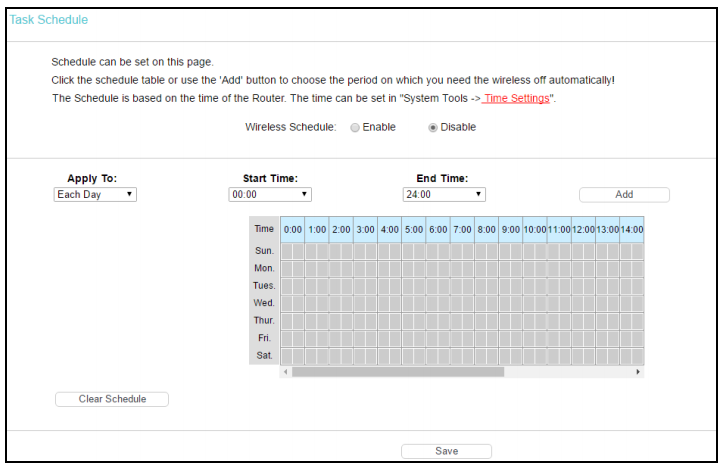
Click the schedule table or use the Add button to choose the period you need the wireless off.
Before configure the wireless schedule, please set system time first.
How to configure system time of TD-W9970 (new logo)?
1. Enable Wireless Schedule.
2. Select the day or days you want to switch the wireless off.
3. You can select all day-24 hours or you may enter the Start Time and End Time in the corresponding field.
4. Click to add your selected time to the below table.
5. Click Save to complete the settings.
Get to know more details of each function and configuration please go to Download Center to download the manual of your product.
해당 FAQ가 유용했나요?
여러분의 의견은 사이트 개선을 위해 소중하게 사용됩니다.