


How to Choose Between 2.8 mm, 4 mm, and 6 mm Camera Lenses
Contents
Introduction
This article explains the differences between 2.8 mm, 4 mm, and 6 mm camera lenses and provides guidance on selecting the most suitable lens for different surveillance scenarios.
Lens focal length determines two important characteristics:
- Angle of view, which defines how much of a scene can be captured.
- Magnification, which determines how large objects appear in the image.
In general, shorter focal lengths provide wider coverage, while longer focal lengths provide greater magnification and longer monitoring distances.
Before selecting a camera model, it is important to consider your surveillance requirements, including the desired coverage area and monitoring distance. The following factors can help you choose the appropriate lens focal length.
How to choose a camera lens
Factor 1: FOV (Field of View)
Field of View (FOV) refers to the area that a camera can capture within its field of vision. It is typically measured in degrees and can be expressed as horizontal FOV, vertical FOV, and diagonal FOV.
The focal length of a camera lens directly affects its FOV.
A lens with a shorter focal length provides a wider FOV, allowing the camera to capture more of the surrounding scene. Conversely, a lens with a longer focal length provides a narrower FOV, focusing on a smaller area with greater detail.
Generally:
|
Focal Length |
Horizontal FOV |
Vertical FOV |
Diagonal FOV |
|
2.8 mm |
100°-110° |
54°-59° |
117°-134° |
|
4 mm |
75°-95° |
41°-46° |
88°-105° |
|
6 mm |
50°-57° |
28°-31° |
58°-67° |
If your deployment requires broader scene coverage, selecting a camera with a shorter focal length and wider FOV is recommended.
Factor 2: DORI distance
DORI (Detect, Observe, Recognize, Identify) is an industry-standard measurement used to evaluate the distance at which a camera can capture sufficient detail for different surveillance purposes.
The focal length of a lens directly affects the camera's DORI performance.
A longer focal length provides greater magnification, enabling the camera to monitor subjects at longer distances. As a result, objects appear larger in the image and can be detected, recognized, or identified from farther away
Generally:
|
Focal Length |
Detect |
Observe |
Recognize |
Identify |
|
2.8 mm |
47m-64m |
19m-27m |
9m-13m |
5m-6m |
|
4 mm |
59m-80m |
25m-33m |
12m-16m |
6m-8m |
|
6 mm |
89m-120m |
37m-50m |
18m-20m |
9m-12m |
If you need to monitor targets at greater distances or require more detailed imagery for recognition and identification purposes, a camera with a longer focal length lens is recommended.
VIGI camera lens options
VIGI cameras are available with different focal length options, including 2.8 mm, 4 mm, and 6 mm lenses, depending on the specific model.
Some VIGI camera models are available in multiple focal length options, such as 2.8 mm, 4 mm, and 6 mm versions. On the product page, you can select the desired focal length by clicking the corresponding lens option.
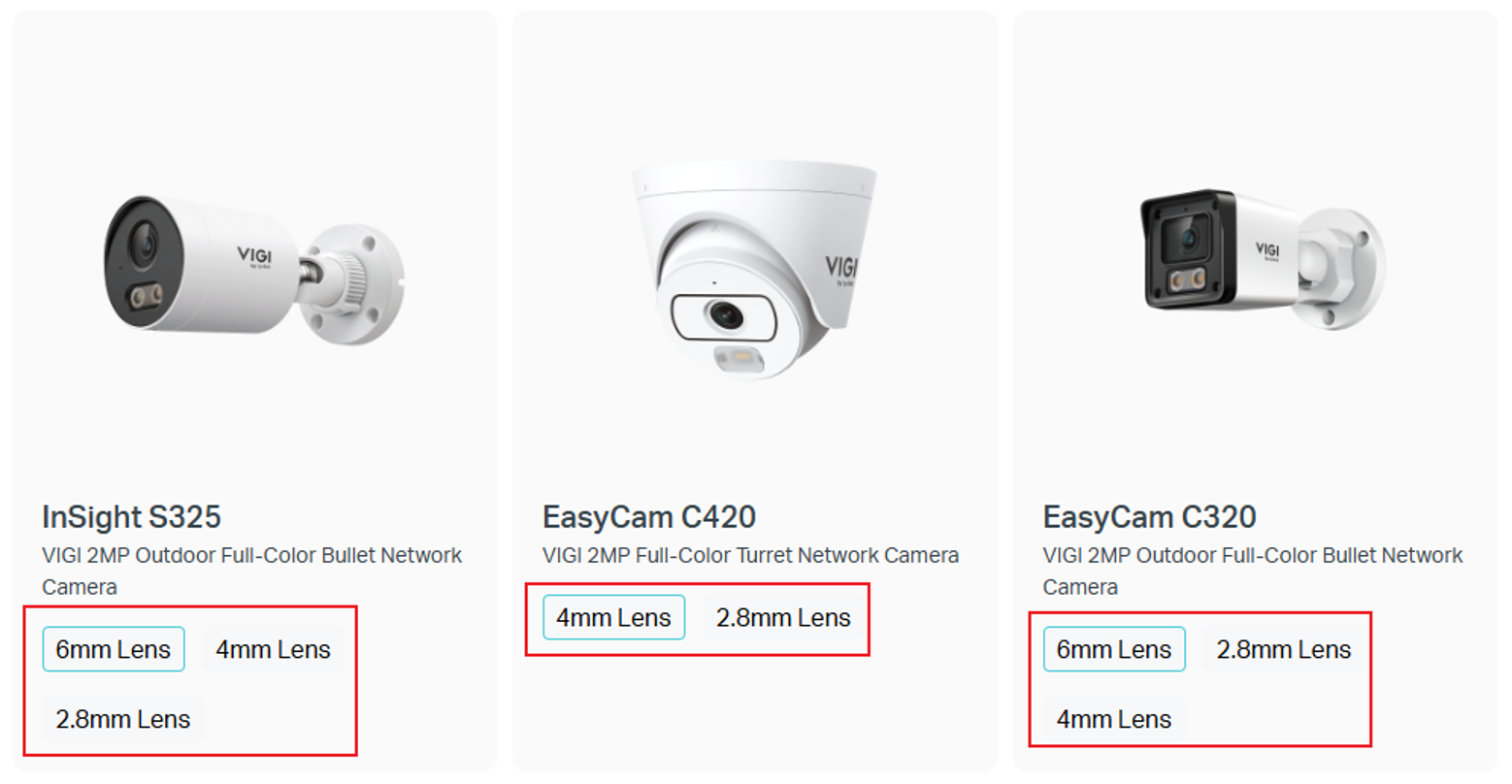
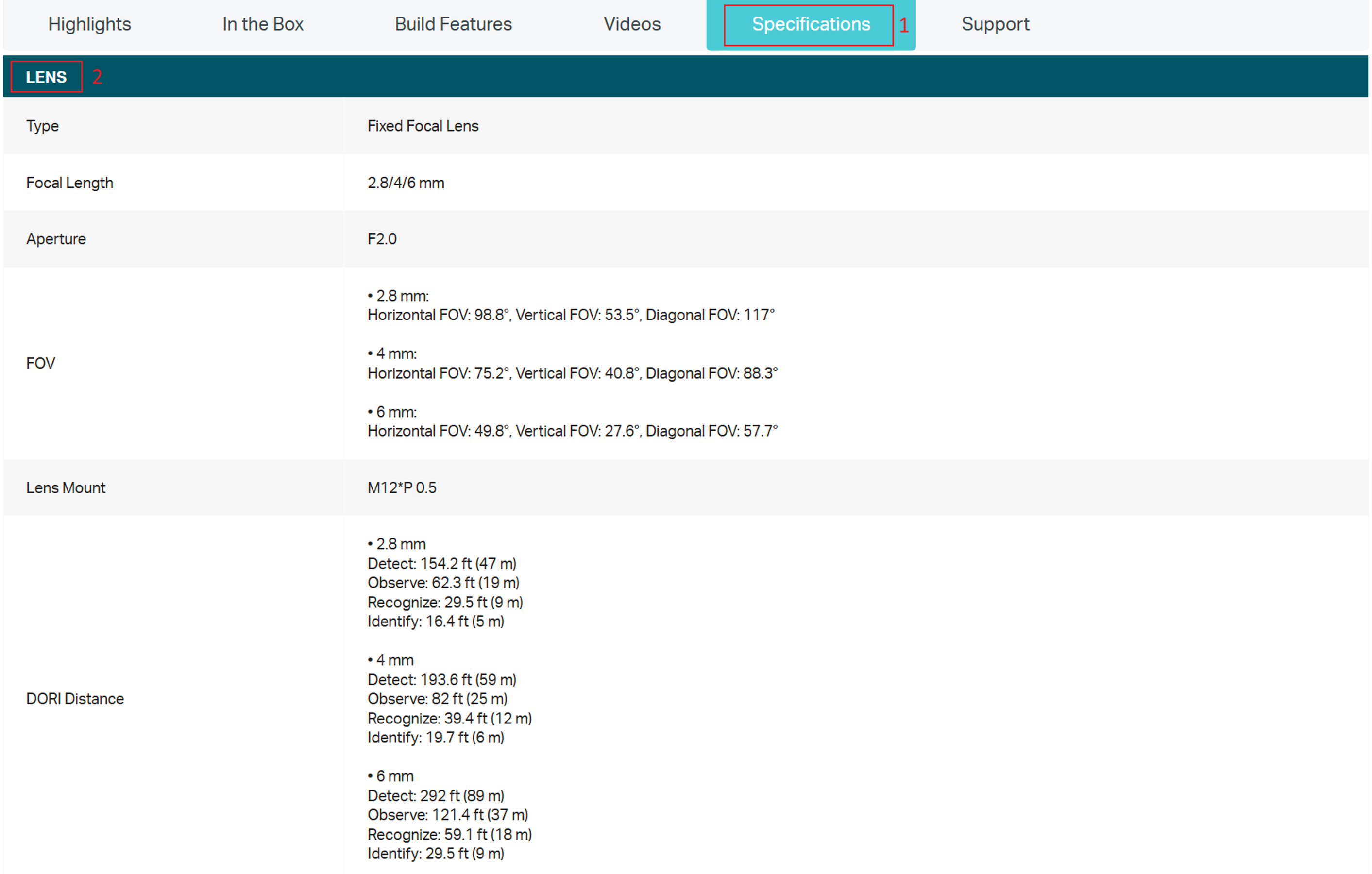
After selecting a lens option, you can go to Specifications > Lens to view detailed parameters for that focal length, such as FOV, aperture, and DORI distance. Comparing these values can help you make a more informed lens selection.
Conclusion
Choosing the right camera lens requires balancing viewing angle and monitoring distance according to your surveillance requirements.
- Select a shorter focal length for a wider viewing angle.
- Select a longer focal length for greater magnification and longer monitoring distances.
By understanding these two factors before deployment, users can choose the most suitable VIGI camera lens for their installation scenario.
To learn more about each function and configuration, please visit Support Home to download or check the manual for your product.
Looking For More
¿Es útil esta pregunta frecuente?
Sus comentarios nos ayudan a mejorar este sitio.

TP-Link Community
Still need help? Search for answers, ask questions, and get help from TP-Link experts and other users around the world.