


TP-Link Wi-Fi 6/6E/7 Product Network Not Showing Up? Update Your Intel Driver
If your TP-Link router, range extender, or Deco system is broadcasting a Wi-Fi 6, Wi-Fi 6E, or Wi-Fi 7 network that doesn't appear in your Windows device's Wi-Fi list, an outdated Intel wireless driver is likely the cause. Certain Intel WLAN adapters running older drivers cannot detect 802.11ax networks. Updating the latest Intel driver resolves the issue.
Key Takeaways
- Some Intel WLAN adapters with outdated drivers cannot detect Wi-Fi 6 (802.11ax), Wi-Fi 6E, or Wi-Fi 7 networks broadcast by TP-Link routers, range extenders, and Deco systems.
- Updating the Intel wireless adapter driver to the latest version resolves the detection issue.
- Intel provides an official driver download page for supported adapters; the link is included on this page.
- Intel AC7265 Family (Rev.C), AC3160, and AC7260 adapters have reached end-of-life status and no longer have driver updates available from Intel. Users with these adapters should contact Intel support.
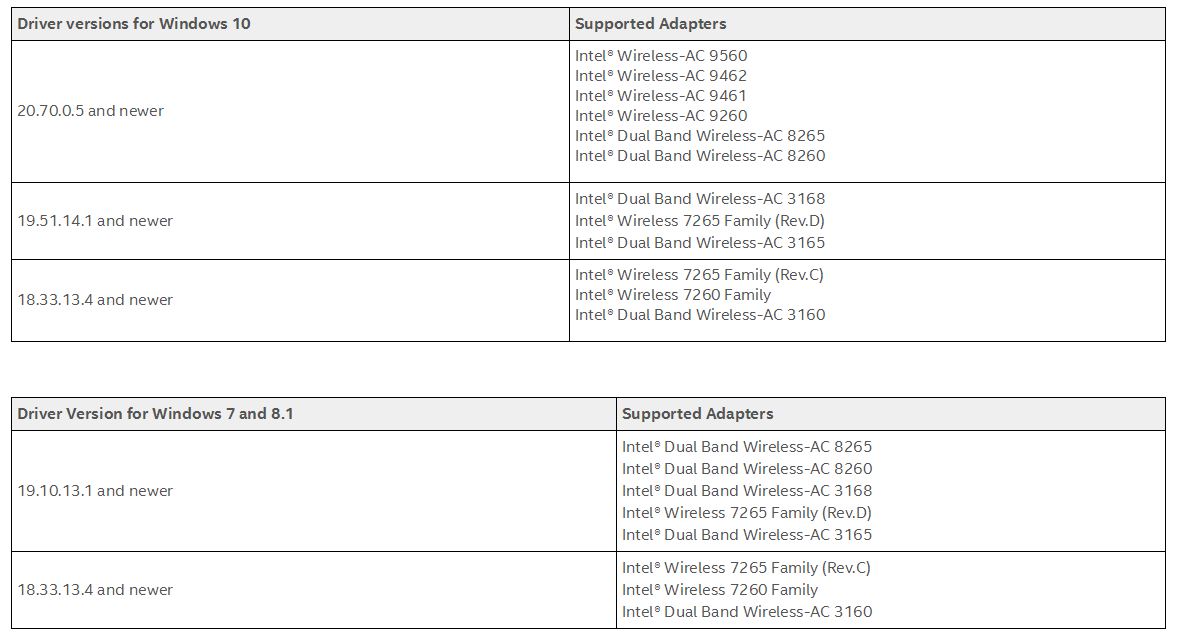
- Intel publishes a compatibility reference listing the minimum driver version required to support 802.11ax (Wi-Fi 6). Users can verify their current driver version against this list.
Why Your Device Can't Find the Wi-Fi 6, 6E, or 7 Network
The issue is not with your TP-Link router, range extender, or Deco system. The problem lies with the Intel WLAN adapter driver installed on your Windows device. Older driver versions do not support detecting 802.11ax (Wi-Fi 6) networks, so the network won't appear in your Wi-Fi list even when the signal is active.
How to Check Your Intel Driver Compatibility
Intel has published a compatibility reference that lists the minimum driver version required to support 802.11ax (Wi-Fi 6). Check your current Intel WLAN adapter driver version and compare it against Intel's driver compatibility reference.
The table below shows the minimum driver versions required for Wi-Fi 6 (802.11ax) support on Windows 10, Windows 7, and Windows 8.1, along with the supported adapter models for each version.
How to Update Your Intel Wireless Adapter Driver
Visit Intel's official wireless adapter driver download page to download the latest driver for your adapter model.
Note:
- Intel AC7265 Family (Rev.C), AC3160, and AC7260 adapters have reached end-of-life (EOL) status. Driver updates are no longer available from Intel for these adapters. If you use one of these adapters, contact Intel technical support or check a third-party source for driver options.
- If you have questions about updating your WLAN card, contact your device manufacturer's technical support team for assistance.
¿Es útil esta pregunta frecuente?
Sus comentarios nos ayudan a mejorar este sitio.

1.0_normal_20210812031127k.png)
