


Download pentru Tapo C675D KIT
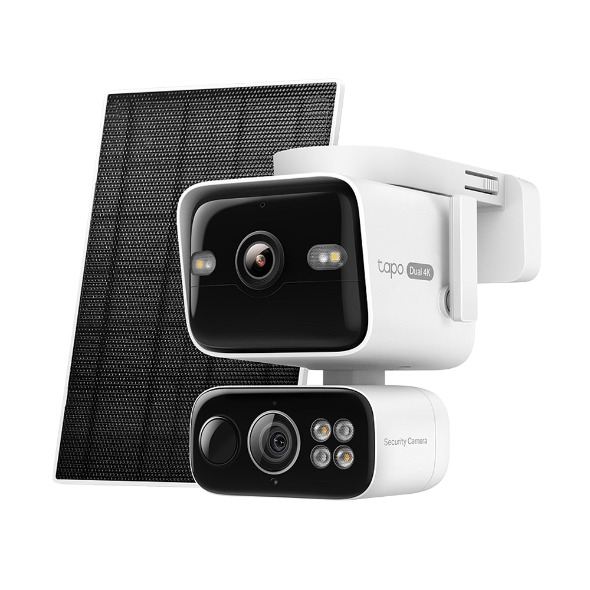 Solar-Powered Dual-Lens Pan/Tilt Security Camera Kit
Setup Video
-
How to Set Up Your Solar-Powered Dual Lens Pan/Tilt Security Camera Kit | Tapo C675D KIT
Elevate your home security with the Solar-Powered Dual-Lens Pan/Tilt Security Camera Kit. Benefit from effortless solar power and ensure comprehensive protection with two 4K lenses that double the coverage, allowing you to capture more with just one device. Experience enhanced visibility and clarity using the telephoto lens, along with features like Synchronized Smart Tracking and One-Tap Smart Focus for a broader and clearer view.
Mai mult Fold -
How to Mount Your Solar-Powered Dual Lens Pan/Tilt Security Camera Kit | Tapo C675D KIT
Elevate your home security with the Solar-Powered Dual Lens Pan/Tilt Security Camera Kit. Benefit from effortless solar power and ensure comprehensive protection with two 4K lenses that double the coverage, allowing you to capture more with just one device. Experience enhanced visibility and clarity using the telephoto lens, along with features like Synchronized Smart Tracking and One-Tap Smart Focus for a broader and clearer view.
Mai mult Fold
FAQ-uri
- What Is Wake-Up Sensitivity on the Tapo Battery Camera or Doorbell
- Notifications: How to Set Up and Manage Tapo & Kasa Alerts in the Tapo App
- How to Configure Homes and Rooms in the Tapo App
- Cum resetez camera mea Tapo la setările din fabrică: Două metode
- How to Delete Your TP-Link Account (TP-Link ID)
- Anulare și rambursare Tapo Care
- How to Set Up Geofencing on the Tapo/Kasa App
- How to Configure the Smart Dual Tracking Feature for Tapo Dual-Lens Camera
- How to Configure the Tap to Focus Feature for Tapo Dual-Lens Camera
- Cum pot conecta dispozitivul meu Tapo (priză smart, cameră smart, bec smart) la Google Home
- How to Stream Tapo / Kasa Camera on Google Device
- Why Can't I Receive the SMS Verification Code from the Tapo App? How to Fix It
- Cum configurez camera Tapo
- General Questions about Tapo Care
- How to Enable and Use AI Zoom on Tapo Cameras
- Cum să te folosești de Widget-uri pentru a controla dispozitivele și scurtăturile Tapo pe iOS
- What can I do if I can’t find my Tapo camera on Tapo app?
- How to Get Diagnostic Logs from Tapo Cameras and Doorbells
- Tapo SD Card Playback Issues: Fix Video Playback Problems on Your Camera
- Încetarea serviciilor IFTTT pentru produsele Tapo și Kasa
- How to Enable and Use Snooze Alerts on Tapo Cameras and Doorbells
- Understanding AI Chat Usage Limits in Aireal
- Ce pot face dacă am uitat parola mea pentru contul cloud (Tapo priză inteligentă, cameră inteligentă, bec inteligent)
- How to Redeem Your Tapo Care Redemption Code
- Tapo Camera Battery Draining Fast? Find Out How to Fix It!
- Kasa and Tapo Smart Devices Not Working with Alexa: Troubleshooting Guide
- Tapo Home Mode and Away Mode: What They Are and How to Set Them Up on Kasa and Tapo Cameras and Doorbells
- De ce nu pot să mă înscriu?
- How to add new cameras to my Tapo Care plan
- How to upgrade or downgrade my Tapo Care subscription
- How to Fix No Sound and Audio Quality Issues on Your Tapo Camera or Doorbell
- How to Troubleshoot Tapo and Kasa Notifications Not Working or Delayed
- General Questions about Tapo/Kasa Geofencing
- What is Video Summary
- How to fix a flickering issue on Live View of the Tapo Camera
- How to set up routines for Tapo devices via Alexa app
- How to improve video clarity and quality of Tapo Camera
- The most frequent asked questions about TP-Link Sales
- How can I conduct 3DS authentication when purchasing Tapo Care
- How to unlink third-party accounts from your TP-Link ID
- How to verify if it’s the hardware issue of TP-Link smart home
- De ce TP-Link necesită adresa mea de e-mail?
- Why do I receive a "We Noticed a New Login" email?
- How to create 3D Map in the Tapo App for Pad
- Set Privacy Zone for Tapo Camera and Doorbell
- How to update or change the payment method for Tapo Care or Kasa Care
- Tapo/Kasa Devices Appear Offline After Changing or Resetting the Router
- How to Check and Fix an Unstable Tapo or Kasa Network Connection
- Tapo Camera SD Card Installation and Format Guide
- Why do I need to give Local Network permission to TP-Link apps in iOS devices?
- How to view camera SD card recordings on a computer
- Cum să fac ca dispozitivul meu Tapo (priză smart, cameră smart, bec smart) să funcționeze cu Amazon Alexa
- Ce ar trebui să fac dacă nu pot face ca dispozitivele inteligente Tapo (priză inteligentă, cameră inteligentă, bec inteligent) să funcționeze cu Alexa sau Google Home
- Ce pot face dacă actualizarea firmware-ului pentru unul din dispozitivele mele inteligente Tapo (priză inteligentă, cameră inteligentă, bec inteligent) a eșuat?
- How to Fix Tapo or Kasa Camera and Doorbell SD Card Not Formatting or Being Recognized
- Tapo Camera Not Connecting to Wi-Fi: Troubleshooting Guide
- Ce este un ID TP-Link?
- Cum pot identifica modelul dispozitivului meu TP-Link?
- Ce trebuie să fac dacă nu primesc email când înregistrez un cont Cloud sau îmi resetez parola?
- Cum găsesc serial number (număr serie) pe un dispozitiv TP-Link?
- Cum pot afla versiunea hardware a unui dispozitiv TP-Link?