


如何在 Deco 上設定速度限制
限制連接至您的 Deco 裝置的下載與上傳速度。
請依照以下步驟,在 Deco 應用程式(iOS 或 Android)中設定速度限制。
注意:
- 功能會因不同 Deco 型號而異。
- 操作步驟可能因裝置作業系統而有所不同,此處以 iOS 系統為例說明。
1.開啟 Deco 應用程式,於首頁點選「線上用戶端」。

2.找到要限制速度的用戶端,然後點選「速度限制)」。.

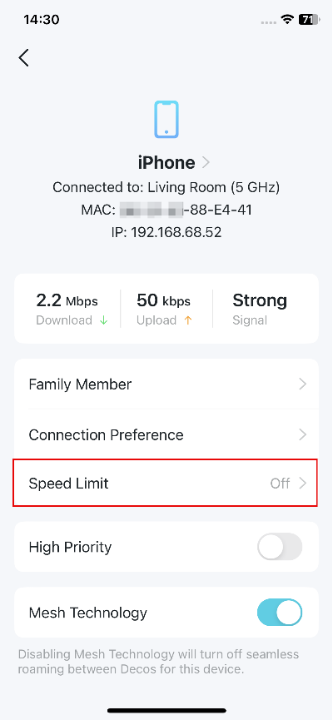
3. 啟用「速度限制」,設定該用戶端的下載與上傳速度。如有需要,您也可以自訂速度值。


4. 點選「儲存」以套用設定。
Looking For More
這篇faq是否有用?
您的反饋將幫助我們改善網站


_Overview_normal_20211130021244m.png)

TP-Link Community
Still need help? Search for answers, ask questions, and get help from TP-Link experts and other users around the world.