


You Can Mix Different Deco Models in One Mesh Network
TP-Link Deco systems are designed to work across models, so you can combine different Deco units in the same mesh network. You manage everything through the Deco app, which guides you through adding and configuring each unit. Keep in mind that the main Deco unit determines which features and capabilities are available across the whole network. This page covers what to know before and after mixing Deco models.
Key Takeaways
- All TP-Link Deco models are compatible with each other and can work together in a single mesh network, including the Deco M5.
- When mixing models, one Deco unit acts as the main router and all others join as satellite nodes.
- The features available in the Deco app depend on which model is set as the main Deco, not the other units in the network.
- For the best performance, use a newer or higher-spec Deco model as the main unit when combining different models.
- Network speed when mixing models will be influenced by the capabilities of each unit in the system.
Why Do Some Features Change When You Mix Deco Models?
Different Deco models support different advanced features, so the feature set available in the Deco app reflects the main Deco unit's capabilities, not the full network.
For example, if you have an existing Deco M5 network and add a Deco X90 as the new main Deco, you may notice that features like Antivirus, Parental Control, and Quality of Service (QoS) are replaced by a new section called HomeShield, which includes Realtime Protection, Parental Control, and QoS. This happens because the Deco M5 supports HomeCare, while the Deco X90 supports HomeShield. Whichever model is set as the main Deco determines what appears in the app.
Which Deco Should Be the Main Unit?
Choosing the right main Deco matters for both features and performance. There are two scenarios to consider.
Scenario 1: If you want a powerline backhaul network
A powerline backhaul network uses your home's electrical wiring to carry data between Deco units, instead of relying on a wireless connection. If you have more than two Deco P7 or Deco P9 units and want this type of setup, set a Deco P7 or Deco P9 as the main Deco. The Deco P7 takes priority over the Deco P9 for this role. The powerline connection will only be established between Deco powerline products.
Scenario 2: For all other mixed Deco setups
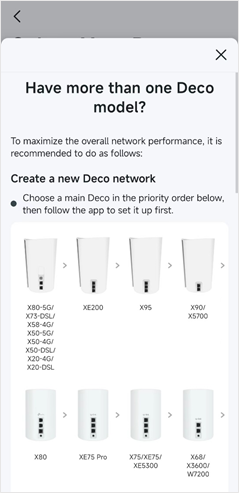
When you are not using a powerline backhaul, use the Deco app's built-in priority order to choose your main unit.
Setting up a new Deco network with multiple models:
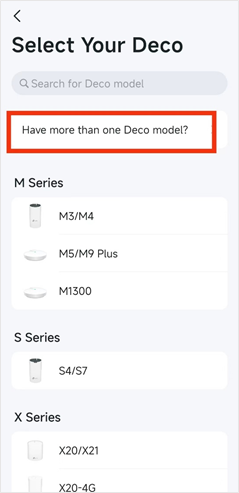
In the Deco app, go to the model selection screen and tap "Have more than one Deco model?" The app will show a priority order to help you select the right model as your main Deco.
Adding a new Deco to an existing network:
Open the Deco app, tap the "+" icon in the upper right corner, and follow the on-screen instructions to add the new unit. Once it has been added, check the priority order and use the Set Main Deco feature to assign the recommended model as the main Deco. To learn more about swapping your primary unit, see How many Deco units do I need? Are they all the same?
In a mixed network, the main Deco connects directly to your modem or Internet source and manages the network. All other Deco units, regardless of model, join as satellite nodes and extend coverage throughout your home.
Key Considerations When Mixing Deco Models
Before combining different Deco models, keep these points in mind:
- Choose your main unit carefully. The main Deco controls which features appear in the Deco app for the entire network. A newer or higher-spec model is generally the better choice for this role.
- Network speed across models. When you mix Deco units with different Wi-Fi speeds or Wi-Fi types (such as Wi-Fi 5 and Wi-Fi 6), the overall network performance will be influenced by the capabilities of the slower units in the system.
- Unit limits apply. There is a maximum number of Deco units you can add to a single network. See How many Deco units can I add to my Deco mesh network? for details.
If you need additional help, contact TP-Link support.
Is this faq useful?
Your feedback helps improve this site.



TP-Link Community
Still need help? Search for answers, ask questions, and get help from TP-Link experts and other users around the world.