


Luces LED y símbolos del adaptador Powerline de TP-Link: qué significan
Esta guía explica el significado de las luces LED y los símbolos de los adaptadores Powerline TP-Link, tanto en funcionamiento normal como en modo de ahorro de energía. La mayoría de los adaptadores Powerline TP-Link siguen el mismo patrón: tres LED que cubren Alimentación, Conexión Powerline y Ethernet. Los modelos con Wi-Fi incluyen un cuarto LED de Wi-Fi. Entender el significado de las luces de tu Powerline te ayuda a identificar rápidamente problemas de conexión o a confirmar que todo funciona correctamente.
Puntos Clave
- Los adaptadores Powerline TP-Link suelen tener tres luces LED: Alimentación (Power), Powerline (conexión) y Ethernet. Los modelos con Wi-Fi incluyen un cuarto LED de Wi-Fi.
- El LED de Alimentación debe permanecer encendido en todo momento. Si está apagado, prueba en otro enchufe de pared. Parpadeará durante el emparejamiento o en modo de ahorro de energía.
- El LED de Powerline se enciende cuando se establece una conexión Powerline correcta y se apaga en modo de ahorro de energía.
- El LED de Ethernet se enciende cuando hay un dispositivo encendido y conectado al puerto Ethernet. Parpadea durante la transferencia de datos.
- El LED de Wi-Fi está encendido o parpadea rápidamente cuando la función inalámbrica está activada. Parpadea lentamente durante la clonación Wi-Fi.
Interpretación de los Símbolos LED de tu Adaptador Powerline TP-Link
Los adaptadores Powerline TP-Link suelen disponer de tres luces LED:
- La primera representa la alimentación eléctrica.
- La segunda representa la conexión Powerline.
- La tercera representa la conexión Ethernet.
A continuación se detalla el significado de cada indicador en tu adaptador Powerline TP-Link:
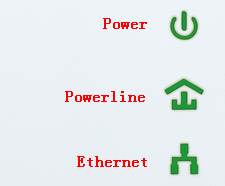
LED de Alimentación (Power):
Debe estar siempre encendido. Si está apagado, prueba a enchufar el adaptador en una toma de pared diferente. Si sigue sin encenderse, contacta con el soporte técnico de TP-Link para verificar la garantía.
Durante el emparejamiento o en modo de ahorro de energía, el LED de Alimentación parpadeará. Una vez finalizado el proceso, volverá a quedarse fijo. En modelos HomePlug AV2 como el TL-PA8010P o el TL-PA8030P, parpadeará cada 15 segundos cuando el modo de ahorro de energía esté activo. Para saber cómo emparejarlos, consulta la siguiente guía de Preguntas Frecuentes:
Cómo asegurar (emparejar) la red Powerline
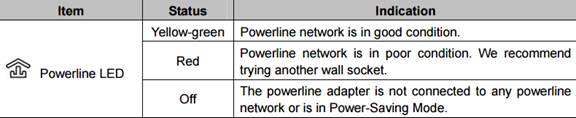
LED de Powerline:
Tras establecer la conexión Powerline con éxito, este LED permanecerá encendido. Se apagará cuando el dispositivo entre en modo de ahorro de energía.
Para los modelos TL-PA511 y TL-PA551, esta luz puede mostrar tres colores distintos:

En los dispositivos HomePlug AV2 como TL-PA8010P y TL-PA8030P, existen tres estados posibles:
LED de Ethernet:
Cuando un dispositivo está conectado al puerto Ethernet y se encuentra encendido, el LED de Ethernet permanecerá iluminado y parpadeará durante la transferencia de datos. El adaptador solo entrará en modo de ahorro de energía tras haber mantenido el LED de Ethernet apagado durante más de cinco minutos.
En los equipos HomePlug AV2 como TL-PA8010P y TL-PA8030P, funciona como un estado encendido/apagado simple que indica si el puerto Ethernet está detectando conexión o no.
LED de Wi-Fi:
En condiciones normales, el LED de Wi-Fi se muestra encendido o parpadeando rápidamente, indicando que la conexión inalámbrica está habilitada. Durante el proceso de clonación Wi-Fi, la luz parpadeará de forma lenta. Puedes mantener presionado el botón Wi-Fi durante al menos cinco segundos para activar o desactivar la función inalámbrica. La función inalámbrica viene activada por defecto; puedes apagarla por la noche y volver a encenderla por la mañana mediante este botón.
Para conocer más detalles sobre cada función y configuración, entra en el Centro de Descargas para descargar el manual de tu producto.
Buscar Más
¿Es útil este artículo?
Tus comentarios nos ayudan a mejorar esta web.
3.0_1532428956469j.jpg)
30_1576748452566m.jpg)

TP-Link Community
Still need help? Search for answers, ask questions, and get help from TP-Link experts and other users around the world.