How to Configure One-to-One NAT on SafeStream Routers Using the Old GUI
User Application Requirement
Последнее обновление:July 27, 2026
One-to-One NAT (Network Address Translation) creates a relationship that maps valid public IP addresses to private IP addresses hidden by NAT. A device with a private IP address can be accessed at the corresponding valid public IP address.
For example: You have a WEB server (IP address: 192.168.0.3) and a FTP server (IP address: 192.168.0.4) in local network, owning a public IP address range of 123.1.1.2 to 123.1.1.4 assigned by ISP. 123.1.1.2 is used as WAN IP address of the router, 123.1.1.3 is used for WEB server and 123.1.1.4 is used for FTP server. With One-to-One NAT, the servers with private IP addresses may be accessed at the corresponding valid public IP addresses.
NOTE: One-to-One NAT take effect only when the connection type of WAN is Static IP.
Step 1:
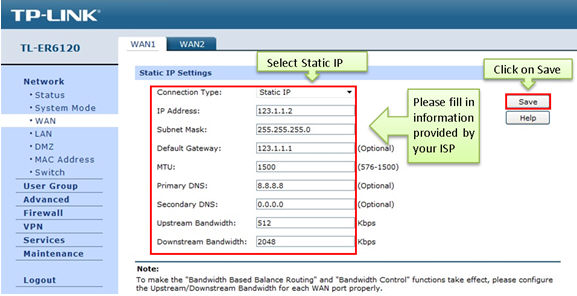
Click on Network ->WAN, select Static IP as Connection Type, fill in the information provided by ISP, in this example we use 123.1.1.2 as WAN IP address.
Step 2:
Click on Save.
Step 3:
Click on Advanced ->NAT ->One-to-One NAT, enter Mapping IP Address, for example, 123.1.1.3 is used for WEB server which has private IP address 192.168.0.3.
Step 4:
Select Interface you are using and enable DMZ Forwarding.
Step 5:
Select Activate and click on Add.
Step 6:
Add other One-to-One NAT entries, and you can view information of the entries on the List of Rules.
After that, you can remote access WEB server and FTP server with the corresponding public IP addresses.
To learn more about each function and configuration, please visit Support Home to download or check the manual for your product.
Этот веб-сайт использует файлы cookie для улучшения навигации по сайту, анализа онлайн-активности и обеспечения максимально удобного взаимодействия с пользователем. Вы можете в любое время возразить против использования файлов cookie. Более подробную информацию можно найти в нашей политике конфиденциальности . Не показывать снова
Your Privacy Choices
Этот веб-сайт использует файлы cookie для улучшения навигации по сайту, анализа онлайн-активности и обеспечения максимально удобного взаимодействия с пользователем. Вы можете в любое время возразить против использования файлов cookie. Более подробную информацию можно найти в нашей политике конфиденциальности . Не показывать снова
Basic Cookies
These cookies are necessary for the website to function and cannot be deactivated in your systems.
Analysis cookies enable us to analyze your activities on our website in order to improve and adapt the functionality of our website.
The marketing cookies can be set through our website by our advertising partners in order to create a profile of your interests and to show you relevant advertisements on other websites.