


CCTV Network Design Guide: Bandwidth, Storage, PoE, and Network Security
Published: August 4, 2026 | Last Updated: August 4, 2026
A CCTV network needs four things sized before any camera goes up: the bandwidth the cameras will consume, the storage their footage requires, the PoE budget the switch has to deliver, and how isolated camera traffic will be from the rest of the business. None of these fails on day one. They surface weeks or months later as buffering playback, a full drive, a switch tripping its power budget, or a compromised camera that turned out to have a path to everything else.
Quick Answer
-
Bandwidth scales with resolution and codec. A 1080p camera runs roughly 2 to 4 Mbps on H.265 and 4 to 8 Mbps on H.264, so codec choice can double or halve how many cameras a link carries.
-
Camera PoE draw is not constant. Infrared illuminators engage at night, and heaters draw in bad weather, so the peak draw exceeds the spec sheet figure, and the budget margin has to account for it.
-
Isolation is the step most systems skip. On VIGI NVRs, Network Isolation puts PoE-connected cameras on their own subnet automatically, though only for cameras added through the TP-Link Protocol.
Table of Contents
What Does a CCTV Network Need to Plan For?
How Much Bandwidth Does an IP Camera Use?
How Much PoE Budget Does a Camera System Need?
How Far Can Cameras Be From the Switch?
Why Should Cameras Be Isolated From the Main Network?
What Does a CCTV Network Need to Plan For?
Four things are sized before installation: bandwidth, storage, power, and isolation.
Adding security cameras to an existing network is not the same as adding a few more devices. Every IP camera streams continuously, competing for bandwidth with everything else, and a poorly planned camera system can degrade POS terminals, VoIP calls, or Wi-Fi for the rest of the business. Getting any of the four wrong rarely causes an immediate failure, which is precisely why it is worth planning: the symptoms appear long after the installer has left, and by then they look like unrelated problems. Cameras sit inside a larger infrastructure design, and the order those decisions should be made in.
What it means for you: if a camera quote does not mention bandwidth, storage, PoE budget, and isolation, it is a hardware list rather than a network design.
How Much Bandwidth Does an IP Camera Use?
Bandwidth depends on resolution, frame rate, and which codec compresses the stream. These are planning ranges rather than guarantees.
Feature-to-Benefit: Bandwidth by Resolution and Codec
|
Resolution |
Typical bandwidth (H.265) |
Typical bandwidth (H.264) |
What this means in practice |
|---|---|---|---|
|
720p |
1 to 2 Mbps |
2 to 4 Mbps |
Adequate for identifying activity, not faces at distance |
|
1080p (2MP) |
2 to 4 Mbps |
4 to 8 Mbps |
The common business default, balancing detail against load |
|
4K |
4 to 8 Mbps |
16 to 32 Mbps |
Detail at a distance, up to eight times the 1080p H.265 load |
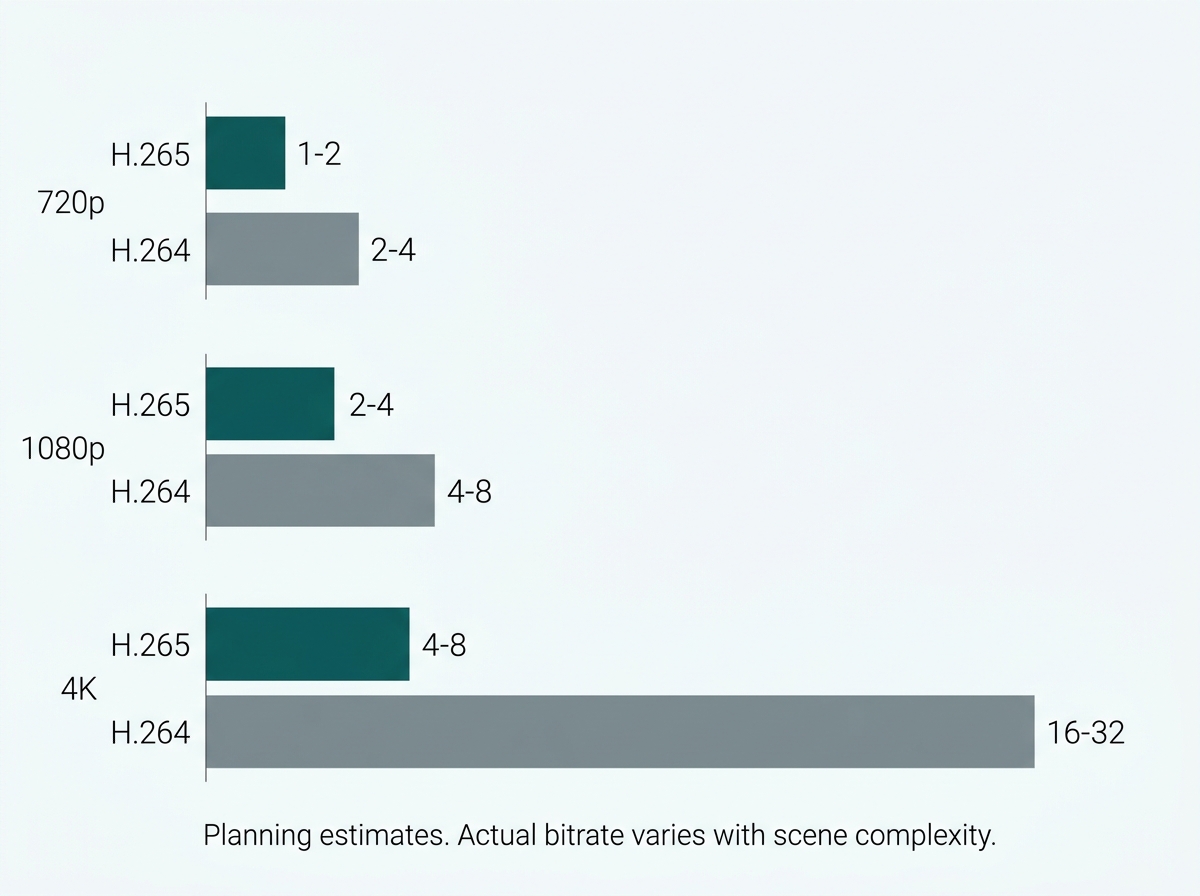
A 720p camera consumes roughly 1 to 2 Mbps on H.265 and 2 to 4 Mbps on H.264. A 1080p camera consumes roughly 2 to 4 Mbps on H.265 and 4 to 8 Mbps on H.264. A 4K camera consumes roughly 4 to 8 Mbps on H.265 and 16 to 32 Mbps on H.264. The gap between codecs widens sharply at higher resolutions, which is why codec support matters more on a 4K deployment than a 720p one.
H.265 was designed to deliver roughly half the bitrate of H.264 at equivalent quality, so a network sized for H.264 cameras can often carry close to twice as many H.265 cameras. Treat that as the design intent rather than a guarantee: actual compression varies with scene content and encoder implementation, and a busy retail entrance generates considerably more data than a static stockroom at identical settings.
What it means for you: total your cameras at the H.264 figure if any of them might fall back to it. Sizing at the H.265 number and then discovering a camera does not support it is an expensive way to learn the difference.
How Do You Size CCTV Storage?
Work backwards from the retention period, not forward from the camera count. Multiply each camera's bitrate by the recording duration and the number of cameras, then convert to total capacity.
Most commercial systems plan for 30 to 90 days of retention. Continuous recording needs substantially more capacity than motion-triggered recording, which writes only when something in the frame changes. Many businesses mix the two: full frame rate and resolution during trading hours when detail matters and reduced settings overnight when it usually does not.
What it means for you: decide the retention period first, because it is the multiplier. Every other storage decision is downstream of that one number, and it is often set by an insurer or a client contract rather than by preference.
How Much PoE Budget Does a Camera System Need?
More than the sum of the spec sheets, because a camera's power draw is not constant.
The figure printed on a camera's specification is generally its steady daytime draw. At night, infrared illuminators engage, and consumption rises. PTZ units with built-in heaters draw substantially more in cold or wet conditions, which in Philippine deployments means the wet season rather than winter. A ten-camera system listed at 8W each totals 80W on paper and does not stay at 80W after dark.
That is why the projected peak, not the spec-sheet total, is the number to budget against. Size the switch 20 to 30 percent above that peak, which covers the night-time increase, the power lost across long cable runs, and the near-certainty that someone will want to add two more cameras next year. On the ten-camera example, a switch rated around 120W is the sensible target rather than one rated at 85W.
That margin is the same one that applies to any PoE deployment. What changes for cameras is the number you apply it to, since an access point's draw does not swing between day and night the way a camera's does. Our PoE switch guide for businesses covers the standards, the class-based reservation mechanics, and the general budgeting case. It is also worth knowing that a switch's rated PoE budget is derived under laboratory conditions and is not guaranteed in the field, varying with the environment, which is the underlying reason margin exists at all.
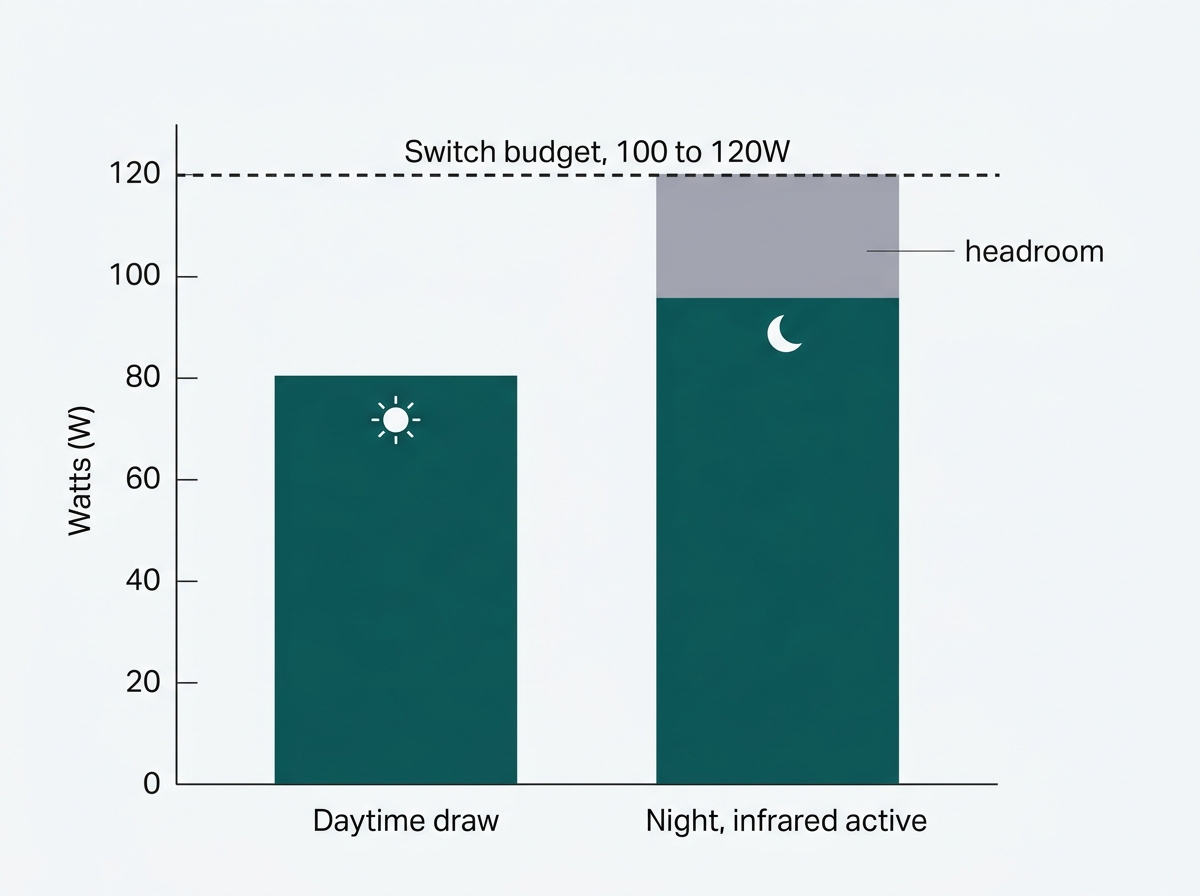
What it means for you: size against nighttime draw, not the spec sheet total. If your calculation lands within ten percent of a switch's rating, move up a model.
How Far Can Cameras Be From the Switch?
Standard PoE cabling is limited to 100 meters per run, the same limit that applies to any Ethernet connection.
Camera installations covering larger areas, car parks, warehouse perimeters, and multi-building sites often rely on an extended PoE mode reaching roughly 250 meters, with the port dropping to 10 Mbps in exchange. For surveillance cameras, that trade is usually acceptable, since a single camera stream fits comfortably inside 10 Mbps at most business resolutions. Check the specifics on your switch, since extended modes carry their own limits on how many powered devices they support.
What it means for you: measure your longest run before choosing a switch. If anything sits beyond 100 meters, extended mode availability moves from a nice feature to a requirement.
Why Should Cameras Be Isolated From the Main Network?
Because an IP camera is a networked computer, and if it sits on the same flat network as staff machines and POS terminals, a compromised or unpatched camera has a direct path to all of them.
Most CCTV planning covers bandwidth, storage, and power, then treats isolation as an afterthought if it is addressed at all. The deliberate approach puts cameras on their own segment, so the camera address range is not reachable from a computer on the main network, and compromising one changes nothing about access to the other. Our network segmentation explained guide covers how to plan those zones generally.
For camera systems specifically, some NVRs do this without any VLAN configuration on the switch. On VIGI NVRs, the feature is called Network Isolation, found under Settings, Network, Network Isolation. It separates the NVR's built-in PoE ports from its LAN port into different subnets and assigns connected cameras internal addresses automatically, defaulting to 192.168.253.x and configurable from a chosen Start IP. Cameras stay reachable for recording and live view through the NVR while having no direct communication with the main LAN. There is also a PoE Access to Internet setting that determines whether those cameras can reach the internet at all, and for cameras with no legitimate outbound need, switching it off closes a common exposure entirely.
Two limits decide whether this covers your deployment. Network Isolation only applies to cameras added through the TP-Link Protocol, so third-party cameras added by other means are not included. And it only isolates cameras connected to the NVR's PoE ports, since cameras connected through LAN ports continue to use the main LAN subnet. A mixed installation therefore still needs VLAN segmentation on the switch for the cameras that fall outside those two conditions. Enabling or disabling the feature restarts the NVR, and it may require a firmware update.
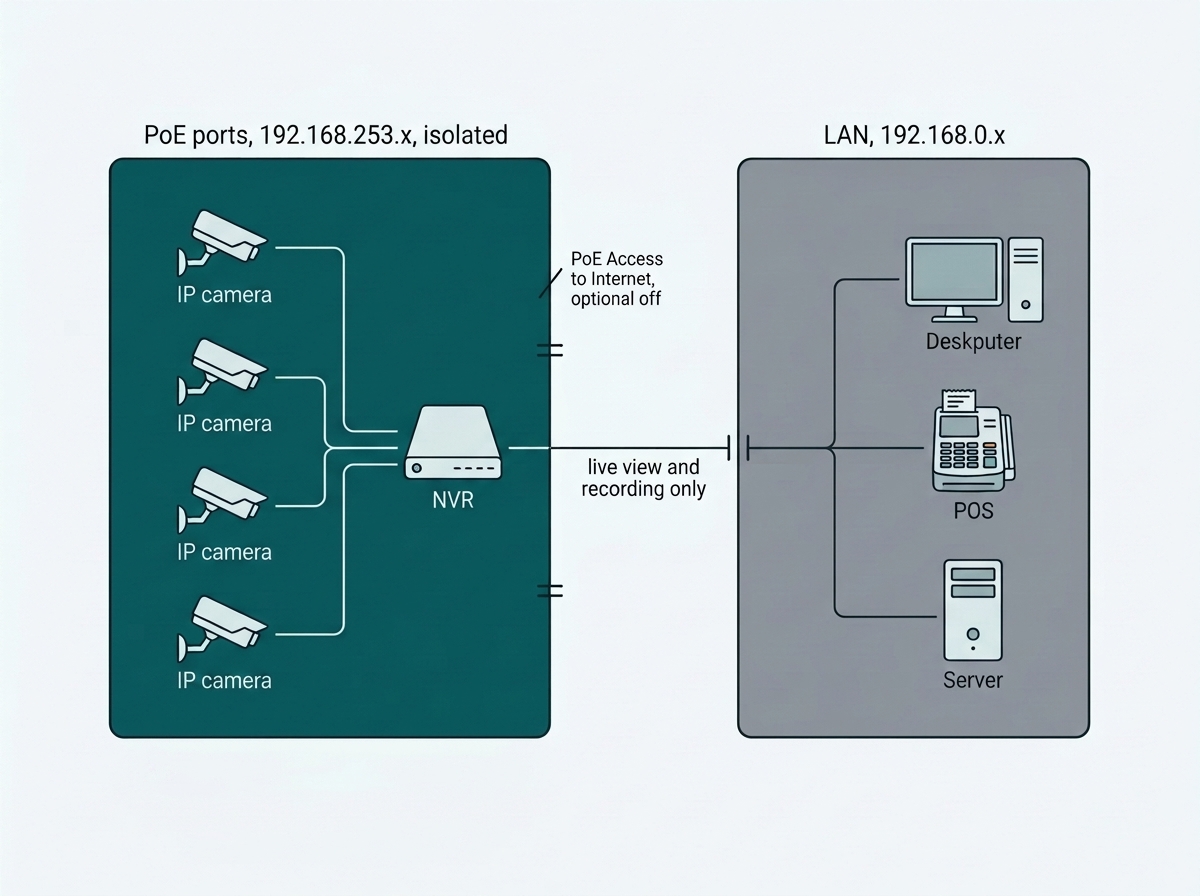
What it means for you: if you are buying cameras and an NVR together and they support this, isolation costs you a setting rather than a switch configuration project. If your deployment mixes brands or connection methods, plan VLANs as well.
For the switch hardware CCTV networks run on, see the full PoE switch guide for businesses, and for more on isolating camera traffic specifically, see network segmentation explained. To see PoE switch models designed for surveillance deployments, explore Omada PoE switches for surveillance.
Frequently Asked Questions
How much bandwidth does one IP camera use?
It depends on resolution and codec. A 1080p camera on H.265 typically uses 2 to 4 Mbps, while the same resolution on H.264 uses 4 to 8 Mbps. 4K ranges from 4 to 8 Mbps on H.265 up to 16 to 32 Mbps on H.264. These are planning estimates, and actual usage rises with scene activity.
How much storage do I need for a CCTV system?
Multiply each camera's bitrate by the retention period and the number of cameras. Most commercial systems plan for 30 to 90 days, and motion-triggered recording reduces the requirement substantially compared with continuous recording.
Should security cameras be on their own network or VLAN?
Yes. Isolating cameras onto their own segment means a compromised or unpatched camera has no direct path to computers, POS systems, or other business devices. Some NVRs provide this automatically for cameras on their PoE ports, and a mixed deployment still needs VLAN segmentation on the switch.
How much PoE budget headroom should a camera switch have?
Size the switch 20 to 30 percent above projected peak draw, the same margin that applies to any PoE deployment. What differs with cameras is the peak itself: consumption is not constant, since infrared illuminators engage at night and heaters draw more in wet or cold conditions, so peak draw exceeds the daytime figure on the specification sheet.
What is the difference between H.264 and H.265 for camera bandwidth?
H.265 is the newer codec, designed to deliver equivalent quality at roughly half the bitrate of H.264, which can let a network carry close to twice as many cameras. Actual savings vary with scene content and encoder implementation rather than landing on a fixed 50 percent.
Does NVR network isolation work with any camera?
Not necessarily. On VIGI NVRs, Network Isolation applies to cameras added through the TP-Link Protocol and only to those connected to the NVR's built-in PoE ports. Cameras connected through LAN ports remain on the main LAN subnet, so mixed installations still need VLAN segmentation for the cameras that fall outside those conditions.
Can I add cameras to my existing office network without upgrading it?
Sometimes, depending on available bandwidth, the switch's PoE capacity, and free port count. Assess the existing infrastructure before adding cameras rather than after, since the symptoms of an undersized network appear weeks later and rarely look like a camera problem.
Final Thoughts
A CCTV network that still works well a year after installation plans four things upfront: enough bandwidth for the resolution and codec chosen, enough storage for the retention period required, enough PoE budget to cover cameras at night rather than at noon, and isolation that keeps camera traffic off the business network.
The last one is the piece most systems skip, and it is the one that turns a single unpatched camera into a route toward everything else. It is also the cheapest of the four to get right, provided it is planned in rather than retrofitted, and on the right NVR it is a setting rather than a project.
If you are specifying a camera system now, the numbers to bring are the ones that determine everything else: camera count and resolution, the retention period you need, your longest cable run, and whether the cameras and NVR come from one vendor or several. Give an Omada specialist those four, and you will get back a switch sized against night-time draw rather than spec-sheet draw, a storage figure for your retention target, and a clear answer on whether NVR-level isolation covers your deployment or whether you also need VLANs on the switch. Explore Omada PoE switches for surveillance to compare total PoE budget and per-port power across the range, and check the budget figure on your shortlisted model's datasheet rather than the category page, since it varies widely within a series.