


Where to Find the Default Access Credentials on a TP-Link Device
The TP-Link web management page lets you configure and manage your device from any web browser on Windows, Mac, or UNIX. To log in for the first time, you need your TP-Link default access credentials — the default username, password, and login URL used to access the web management page. These credentials vary by product, so always check your specific device. There are two places to find them: the device label and the Quick Installation Guide (QIG). For help logging in after you have your credentials, see "TP-Link Router Login: Access Your Web Management Page."
Key Takeaways
- The default access credentials contain the login information needed to access the TP-Link web management page for the first time.
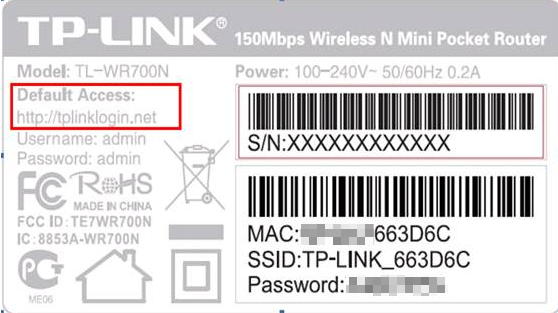
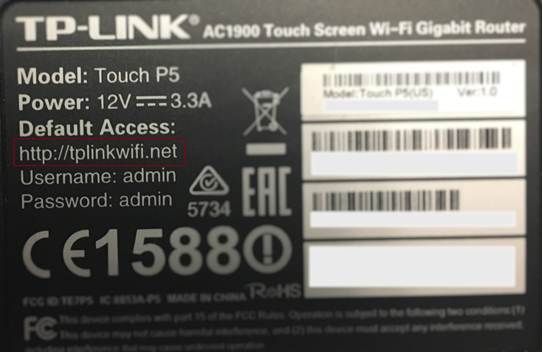
- The credentials are printed on a label on the back or bottom of the device, typically under a heading such as Default Access, Default Settings, or Default Wireless Access.
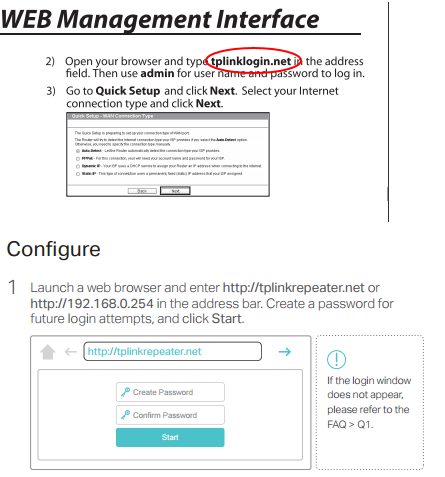
- The default access is also available in the Quick Installation Guide (QIG) included with the product.
- Default credentials vary by product — always check the label or QIG for the correct information for your specific device.
Check the Product Label
Turn the device over and look at the label on the back. The default access credentials are listed under a heading such as Default Access, Default Settings, or Default Wireless Access.
Check the Quick Installation Guide
The default access information is also available in the Quick Installation Guide included with your product.
Looking For More
Is this faq useful?
Your feedback helps improve this site.

TP-Link Community
Still need help? Search for answers, ask questions, and get help from TP-Link experts and other users around the world.