


What Is a VPN Router and How Does It Work?
Remote teams, multiple locations, and sensitive data all introduce one problem: how do you secure traffic without managing dozens of individual VPN connections?
That’s where a VPN router comes in. Understanding what a VPN router is, how it works, and when your business actually needs one helps you make a more informed infrastructure decision.
If you’re evaluating whether a VPN router is the right choice for your business, this guide breaks down everything you need to know, from the main types available to the key advantages and limitations to consider.

Key Takeaways
-
A VPN router encrypts all network traffic at the gateway, so every device on the network is protected without individual VPN software.
-
VPN routers support protocols like IPsec, OpenVPN, and WireGuard, and can operate in both VPN client mode (securing outbound traffic) and VPN server mode (accepting inbound remote connections).
-
VPN routers are best suited for remote workforce access, secure site-to-site connections between branch offices, and protecting sensitive traffic on shared infrastructure.
-
Tradeoffs include higher upfront hardware cost and modest encryption overhead on throughput — the impact varies by protocol and hardware capability.
-
Purpose-built VPN gateways like Omada's ER-series are designed for SMB and multi-site deployments, supporting multiple simultaneous VPN protocols without enterprise-level cost or complexity.
What Is a VPN? A Quick Definition
A virtual private network (VPN) is an encrypted tunnel that routes network traffic through a secure server, protecting it from interception by third parties. It’s widely used by businesses and remote workers to secure access to internal systems and sensitive data. Instead of traffic traveling in plaintext over the public internet, it is encapsulated and encrypted so only the intended endpoints can read it.
The major VPN protocols in use today are IPsec, OpenVPN, WireGuard, and L2TP, each with different tradeoffs in speed, compatibility, and configuration complexity. A software VPN client secures a single device; a VPN router extends that protection to the entire network.
What Is a VPN Router?
A VPN router is a network router or gateway with VPN client or server functionality built in. Rather than relying on each device to run its own VPN app, the router establishes and terminates encrypted tunnels for the entire network, so every connected device is protected without any per-device setup.
The main functional difference from a standard router is that a VPN router encrypts traffic before forwarding it, or decrypts it upon receipt. Every device connecting through the router, whether it’s a laptop, phone, IoT sensor, printer, or point-of-sale terminal, is automatically protected without any per-device configuration.
Omada VPN gateways integrate VPN functionality with centralized SDN management, so both routing and VPN policy are configured from a single controller interface.
How Does a VPN Router Work?
VPN routers operate in two modes that serve different connectivity needs in business deployments. Understanding the distinction helps clarify which configuration, or combination of both, applies to a given environment.
VPN client mode means the router connects outbound to an external VPN server and routes all outgoing network traffic through that encrypted connection. Every device on the local network benefits from that tunnel without any individual configuration.
VPN server mode means the router hosts a VPN endpoint that remote devices or branch offices connect into. Remote workers authenticate and connect to the office gateway, gaining secure access to internal resources as if they were on the local network.
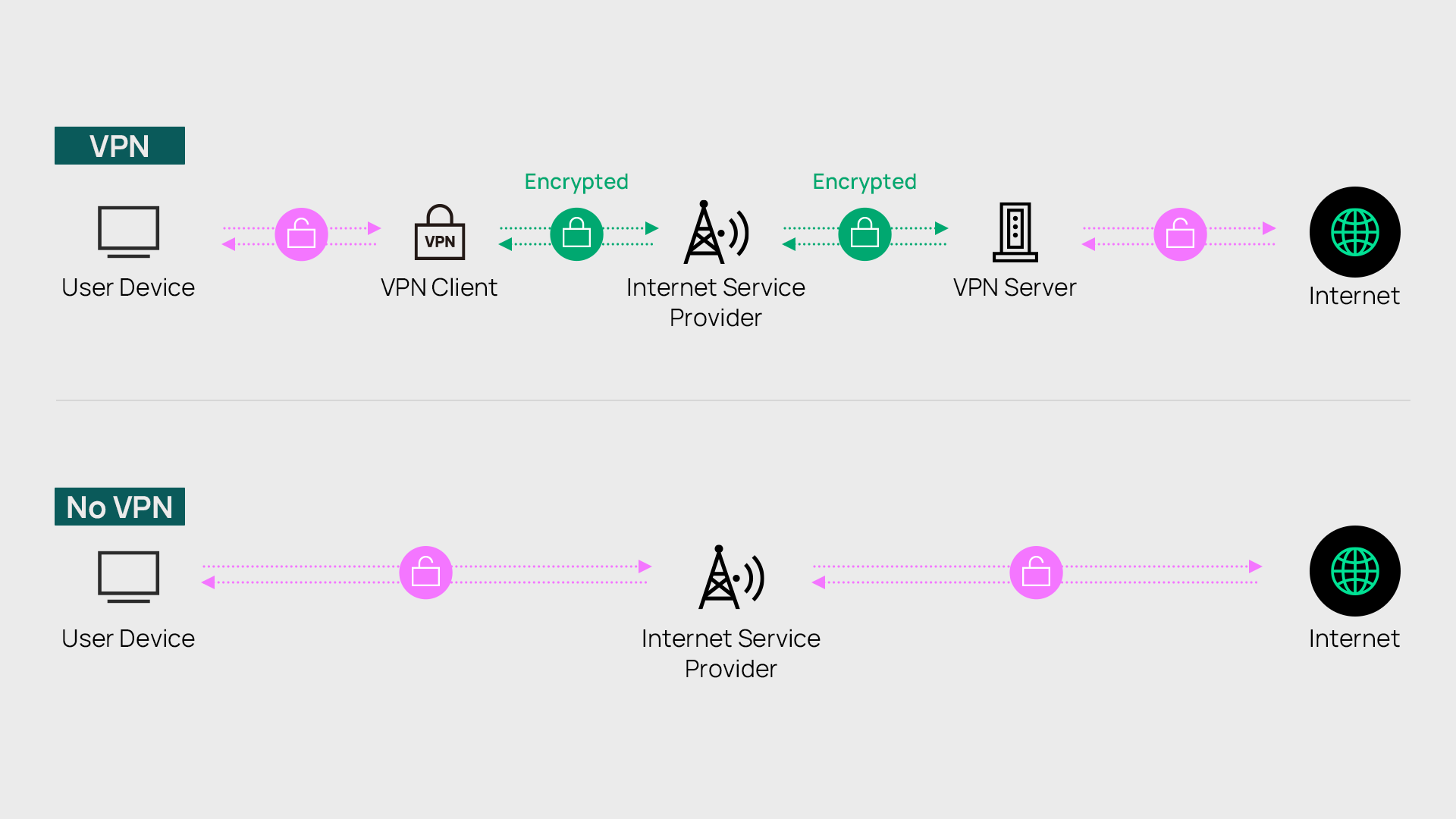
At the data level, outgoing traffic is encrypted by the router before it leaves the network, and incoming VPN traffic is decrypted at the gateway. Each piece of data (packet) is secured in transit, then reassembled at its destination. Remote clients authenticate using credentials or certificates depending on the protocol in use.
Hardware VPN routers offload encryption processing from end devices. In deployments with many simultaneous VPN connections, this offloading is crucial because the router's processor handles encryption without taxing individual endpoints or degrading their performance.
Common business protocols align with specific use cases. IPsec is typically used for site-to-site tunnels between offices, while OpenVPN and WireGuard are common for remote access. L2TP/IPsec remains a widely compatible option for devices with built-in support.
Advantages of a VPN Router
Hardware-level VPN delivers several operational benefits that software VPN clients can't match at network scale. These are the primary advantages for business deployments.
Network-Wide Coverage Without Per-Device Setup
All devices on the network are encrypted automatically through a VPN router, including devices that don't support VPN software such as IoT sensors, network printers, IP cameras, and guest devices. One gateway configuration covers every connected endpoint.
Consumer VPN apps, by contrast, protect one device per license and require manual activation on each machine. They provide no coverage for non-app-capable devices, and any device where the app isn't running or has expired is unprotected.
Centralized Management
VPN configuration, credentials, and protocol settings are managed at the gateway level. For IT managers overseeing multiple sites, this allows for consistent policy enforcement without touching individual endpoints. When a VPN credential needs to be changed or a protocol configuration needs to be updated, it's easy to do in one place.
For MSPs managing networks across multiple client sites, a standardized VPN gateway deployed at each location means remote access, monitoring, and troubleshooting are available immediately without having to manage per-device VPN software across diverse client environments. Pairing a VPN gateway with Omada SDN also enables network segmentation across VLANs, keeping sensitive traffic isolated from guest or IoT traffic at the same gateway.
Secure Site-to-Site Connectivity
VPN routers enable encrypted tunnels between branch offices or remote sites, creating a private network across geographically separated locations. Employees at a branch office access the same internal resources as if they were physically on the main office network, without exposing those resources to the public internet.
This is an important factor for businesses with two or more locations. Each site's gateway establishes a persistent VPN tunnel to the hub location, and traffic between sites stays encrypted in transit.
Always-On Protection
A hardware VPN router enforces encryption at the network level continuously. Unlike software VPN apps that can be toggled off, ignored, or expire when a subscription lapses, the gateway doesn't require any action from end users. Remote workers connecting from home are protected from the moment their traffic passes through the router.
Disadvantages of a VPN Router
A VPN router is not the right fit for every situation, and the tradeoffs are worth understanding honestly.
Higher upfront hardware costs can be a challenge for some businesses. A purpose-built VPN gateway costs more than a software VPN subscription, and the initial investment is a real consideration for smaller businesses or deployments with limited infrastructure budgets.
Encryption overhead reduces maximum throughput. Every encrypted connection adds processing load, which means the maximum throughput on a VPN tunnel is lower than on an unencrypted connection. The magnitude of that reduction depends on the hardware's processing capability, the protocol used (WireGuard generally adds less overhead than IPsec), and the number of simultaneous tunnels active.
Initial configuration requires networking knowledge. Setting up IPsec tunnels, configuring OpenVPN server mode, or establishing WireGuard peers requires an understanding of network addressing, authentication methods, and protocol parameters. For businesses without a dedicated IT resource, this could be a barrier, though many SMB-focused gateways provide guided configuration interfaces that significantly reduce complexity.
Types of VPN Routers
VPN routers come in several form factors suited to different deployment environments and network requirements. The right type depends on whether the deployment needs integrated Wi-Fi, cellular backup, or compact all-in-one hardware.
Wired VPN Gateway
A wired VPN gateway is a rack-mounted or desktop appliance with multiple WAN and LAN ports for environments where maximum throughput and connection reliability are the priority. There is no integrated Wi-Fi: the gateway manages routing and VPN, while access points handle wireless.
This form factor suits multi-location businesses, branch offices with existing wireless infrastructure, and high-traffic environments where VPN throughput is important. The ER605 is an entry-level option supporting IPsec, OpenVPN, L2TP, and PPTP. For higher-capacity deployments, the ER707-M2 and ER8411 offer higher-throughput options suited to larger sites or multi-site hub deployments.
Wireless VPN Router
A wireless VPN router combines gateway functionality with a built-in wireless access point, handling both routing and Wi-Fi from a single device. This simplifies deployment for smaller environments where a separate access point may not be necessary.
This option works best for smaller branch offices, remote workers' home offices, and smaller retail locations where network demands are predictable and hardware footprint is a consideration. The ER706W supports Wi-Fi 6 wireless alongside full VPN gateway functionality.
4G/LTE VPN Router
A 4G/LTE VPN router adds a cellular WAN connection to the primary wired connection, maintaining VPN tunnels even when the primary ISP link drops. This allows for WAN failover to be handled at the hardware level, with no manual intervention required.
This form factor suits locations with unreliable fixed broadband, temporary deployments, pop-up retail, or any installation where WAN continuity is critical. The ER706W-4G combines Wi-Fi 6 wireless, wired WAN, and cellular backup in a single unit.
Integrated Gateway (3-in-1)
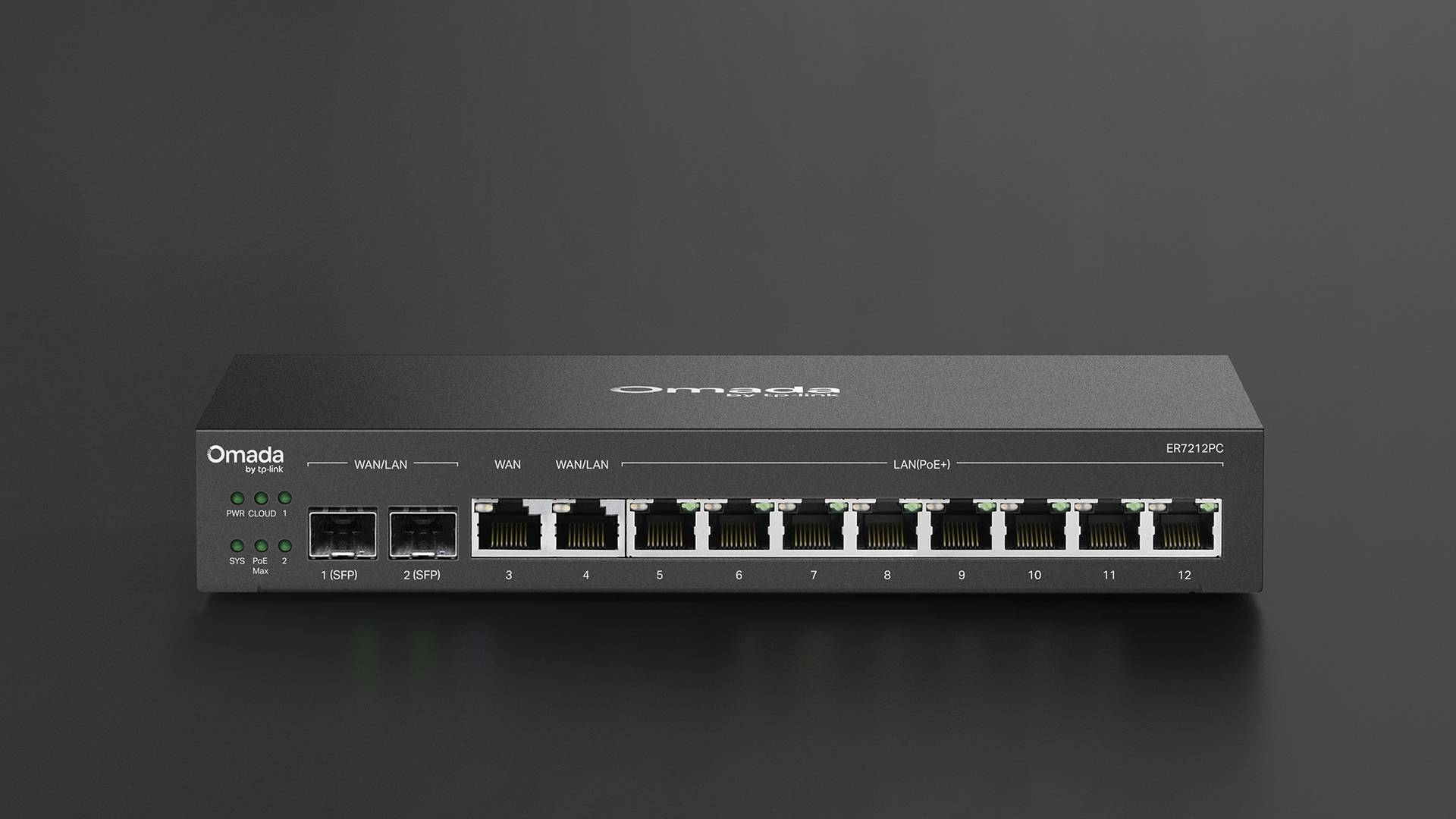
An integrated gateway combines VPN gateway, network controller, and PoE switch functions in a single device. This reduces hardware count and cabinet space for smaller deployments where a full equipment rack isn't practical.
This option is best for small businesses deploying a full Omada SDN network without a dedicated server or hardware controller. The ER7212PC combines the three functions in a compact unit suited to single-location SMB deployments.
Why Do You Need a VPN Router?
The decision to deploy a VPN router comes down to specific business circumstances rather than a universal recommendation. These are the scenarios where it could be the right choice for your business.
Remote workforce access: Employees working from home or traveling can connect securely to the company network without per-device VPN software management. For an IT manager supporting 45+ employees across multiple offices, a gateway-based approach eliminates the overhead of deploying, licensing, and troubleshooting VPN clients on every device.
Branch office connectivity: Businesses with two or more office locations use site-to-site VPN tunnels to share internal resources as if all locations were on a single network. The connection stays encrypted in transit without requiring employees to do anything.
MSP deployments across client sites: For MSPs standardizing their network stack across clients, a VPN-capable gateway built into every installation means remote access and monitoring capabilities are consistent from day one. Site-to-site tunnels between an MSP's management network and client sites enable remote troubleshooting without on-site visits.
Compliance and data protection: Organizations handling sensitive data in medical, financial, or legal environments often have requirements for encrypted transmission between locations. A VPN router satisfies that requirement at the infrastructure level, applying encryption to all traffic regardless of which application or device generates it.

Explore VPN-Capable Gateways for Your Network
A VPN router moves encryption to the network gateway, giving every connected device automatic protection and reducing the management overhead that per-device VPN software creates. For businesses with remote workers, multiple office locations, or sensitive data requirements, it's a foundational piece of network infrastructure.
The right hardware depends on your specific deployment: how many locations, expected VPN throughput, whether cellular failover is needed, and how the gateway fits into network architecture.
Explore the Omada gateway lineup to compare VPN-capable options for SMB and multi-site deployments.
FAQs
What is the difference between a VPN router and a regular router?
A regular router directs traffic between your local network and the internet. A VPN router does the same, but also establishes and terminates encrypted VPN tunnels at the hardware level. The practical difference is that all devices on the network are automatically protected through the VPN router without any per-device software or configuration.
Do I need a VPN router or a VPN app?
It depends on your use case. A VPN app protects one device per installation and requires active management on each endpoint. A VPN router protects the entire network automatically, including devices that can't run VPN software such as IoT devices, printers, and similar hardware. For businesses with multiple devices, remote workers, or multiple office locations, a VPN router is the more practical and consistent solution.
Can any router be used as a VPN router?
Some consumer routers support third-party VPN client configuration through their firmware, but they typically lack the processing capacity, protocol support, and management features of a purpose-built VPN gateway. For business deployments with multiple simultaneous tunnels, site-to-site connectivity, or centralized management requirements, a dedicated VPN gateway is the appropriate choice.