


Managed vs. Unmanaged Switches: Which One Your Office Actually Needs
Published: July 30, 2026 | Last Updated: July 30, 2026
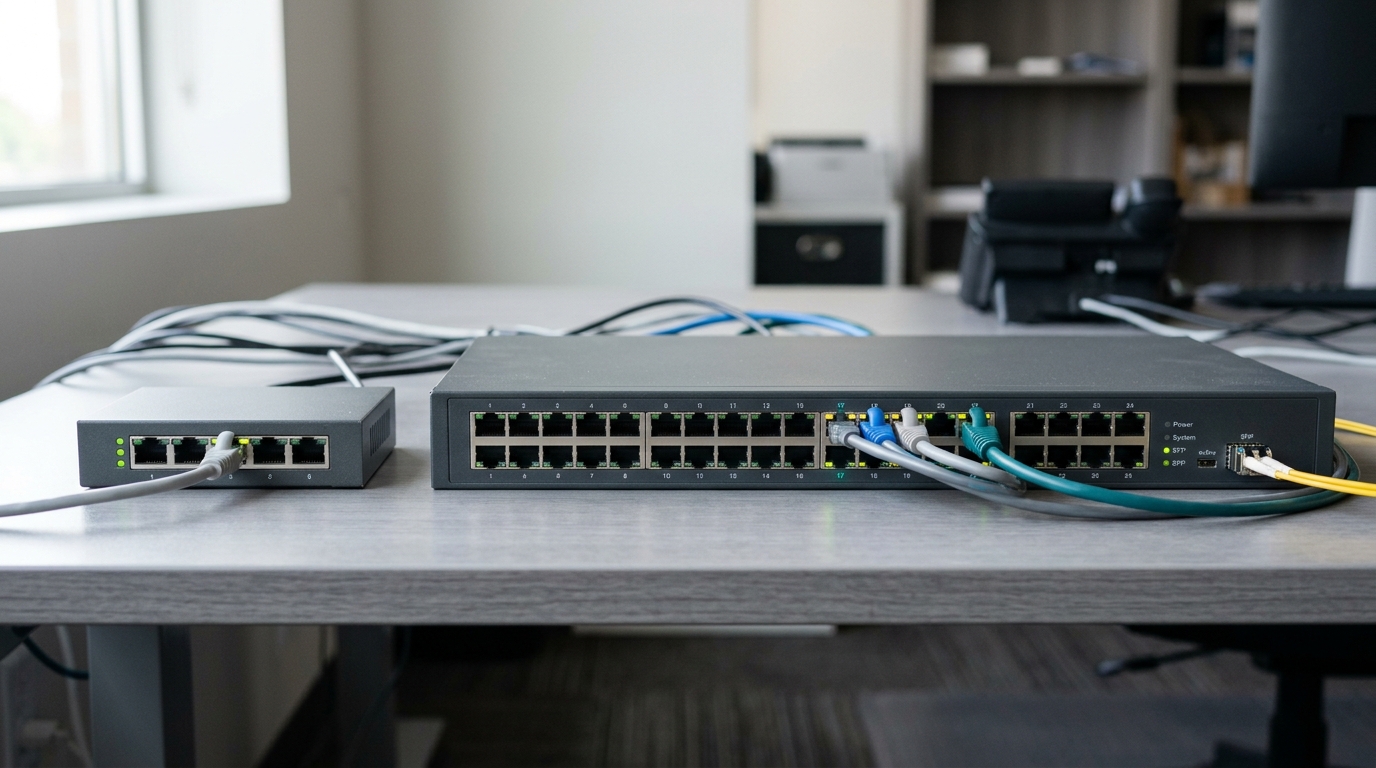
A managed switch lets an administrator configure how traffic moves through the network, create VLANs, prioritize voice and video with QoS, and monitor what each port is doing. An unmanaged switch forwards traffic between connected devices with no configuration options, no visibility, and no way to change its behavior after installation.
Quick Answer
-
An unmanaged switch is plug-and-play with no VLANs, no traffic prioritization, and no per-port visibility. It is the correct choice for a small space carrying one kind of traffic.
-
A managed switch adds VLAN segmentation, QoS, per-port monitoring, and security controls, including 802.1X and access control lists. These matter once guest Wi-Fi, VoIP phones, or cameras share the network with staff devices.
-
Smart switches, which Omada lists as its Agile tier, sit between the two: VLAN, QoS, and cloud management, but no command-line access, no 802.1X, and no static routing.
Table of Contents
What Is the Difference Between a Managed and an Unmanaged Switch?
When Is an Unmanaged Switch the Right Choice?
What Can a Managed Switch Do That an Unmanaged Switch Cannot?
Where Does a Smart Switch Fit Between the Two?
Why Do So Many Managed Switches End Up Running as Unmanaged Ones?
How Should Cost Factor Into the Decision?
What Is the Difference Between a Managed and an Unmanaged Switch?
A managed switch can be configured, monitored, and segmented into VLANs. An unmanaged switch cannot do any of those things. Everything else follows from that one difference.
A managed switch lets an administrator decide how the device handles traffic: creating VLANs to separate departments, prioritizing voice or video with QoS, and seeing which port is carrying what in real time. An unmanaged switch connects devices and forwards packets, and its behavior is fixed from the moment it is plugged in.
If you install the wrong type, a growing office ends up with guest devices sharing a network segment with internal systems, VoIP calls breaking up during busy hours, or no way to tell which port on which switch just went down.
Across the Omada switch range, the unmanaged tier lists no VLAN support, no QoS, no access control lists, no 802.1X, no SNMP, no command-line interface, and no cloud management. Every managed tier lists all of them.
Feature-to-Benefit: Managed vs. Unmanaged at a Glance
|
Unmanaged Switch |
Managed Switch |
What This Means in Practice |
|
|---|---|---|---|
|
Configuration |
None, plug-and-play |
Full configuration via web, app, or CLI |
Decides whether the network can be adjusted after installation or is fixed as bought |
|
VLAN support |
No |
Yes, segmentation by department or device type |
Decides whether guest, staff, and payment traffic can be kept on separate segments |
|
Traffic prioritization (QoS) |
No |
Yes, it prioritizes voice, video, or business-critical apps. |
Decides whether a large file transfer can degrade a live call |
|
Visibility |
None |
Per-Port monitoring, traffic stats, remote diagnostics |
Decides whether a fault is found by lookup or by unplugging cables |
|
Security features |
Minimal |
802.1X authentication, ACLs, port security |
Decides whether an unknown device plugged into a wall port gets network access |
|
PoE |
Available, up to PoE++ |
Available, up to PoE++ |
Not a differentiator. Both can power cameras and access points |
|
Typical use case |
Home networks, single-room setups |
Multi-department offices, hospitality, retail, surveillance |
Matches the switch to how many traffic types need separating |
An unmanaged switch offers no configuration, no VLANs, no traffic prioritization, no monitoring, and only minimal security, which suits home networks and single-room setups.
A managed switch offers full configuration through a web interface, app, or command line, VLAN segmentation, QoS prioritization for voice and video, per-port monitoring with remote diagnostics, and security controls including 802.1X authentication and access control lists, which suits multi-department offices, hospitality, retail, and surveillance.
What it means for you: the deciding factor is traffic variety, not headcount. An office of forty people all doing the same thing on one network may need less switching intelligence than a ten-person clinic running staff devices, patient Wi-Fi, and IP cameras side by side.
When Is an Unmanaged Switch the Right Choice?
An unmanaged switch is the right choice when a network has a handful of devices, one kind of traffic, and no requirement to segment, prioritize, or monitor anything.
It is not a downgrade. A single-room office with five computers and a printer, or a temporary setup for an event, gets nothing back from the added cost and configuration time of a managed switch. Unmanaged switches also stay useful inside larger networks, extending connectivity into low-stakes areas that do not need a segment of their own.
The calculation changes the moment a business adds guest Wi-Fi, VoIP phones, security cameras, or a second department sharing the same physical network. At that point, the network carries traffic types with different security and performance requirements, and an unmanaged switch has no mechanism for telling them apart.
What it means for you: if you can name only one kind of traffic on the network and expect that to hold for the next two years, unmanaged is the correct and cheaper answer. If you can name three, plan for management now instead of replacing hardware later.
What Can a Managed Switch Do That an Unmanaged Switch Cannot?
A managed switch can separate traffic into isolated VLANs, prioritize time-sensitive traffic such as voice, and report on what every individual port is doing. Those three capabilities account for most of the reasons a business moves off unmanaged hardware.
Switching is one layer of a larger design, and the decisions above and below it are covered in our network infrastructure and design guide.
VLANs keep departments and guest traffic apart
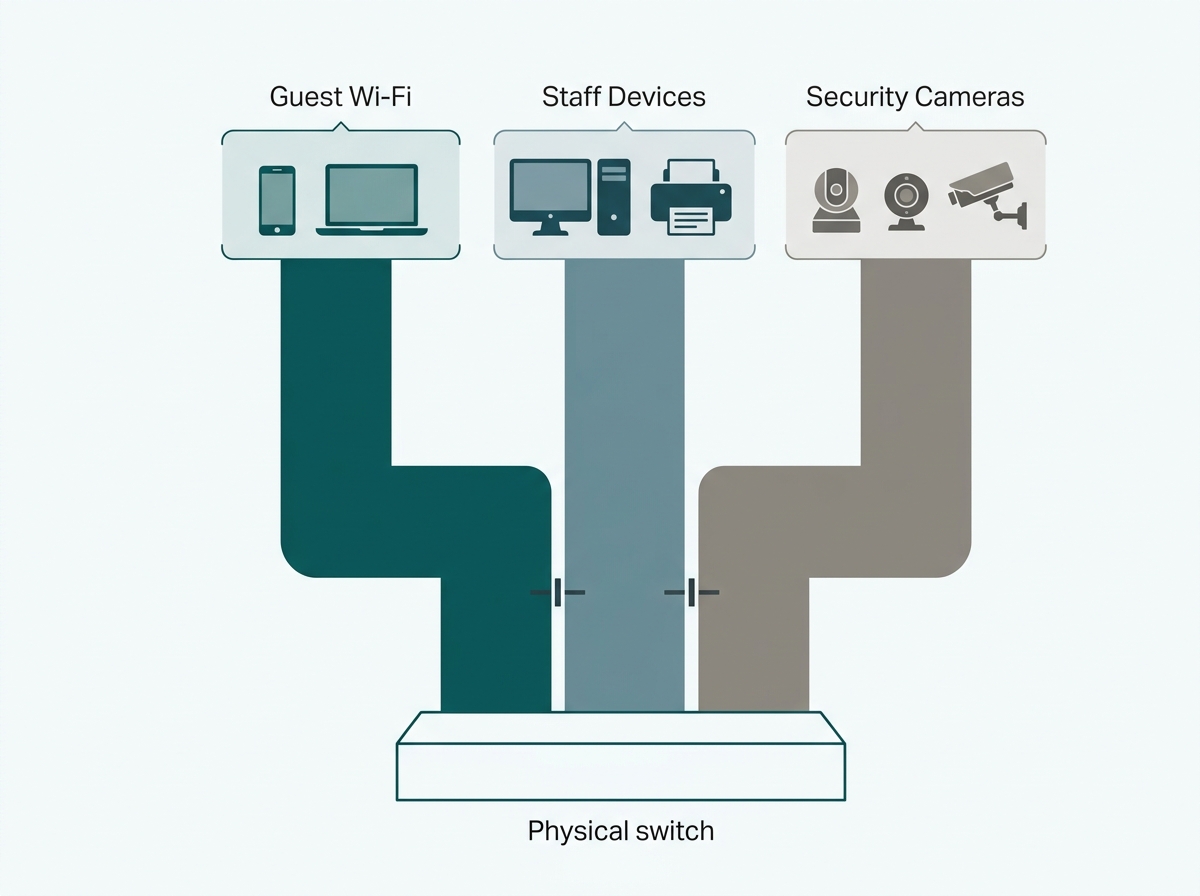
A retail store running point-of-sale terminals, staff Wi-Fi, and guest Wi-Fi through an unmanaged switch has all three sharing one broadcast domain, which means a guest device sits on the same network segment as the payment terminal. A managed switch assigns each to its own VLAN, so guest traffic has no path to POS or staff systems even though all three run through the same physical hardware.
QoS keeps VoIP calls from breaking up during busy hours
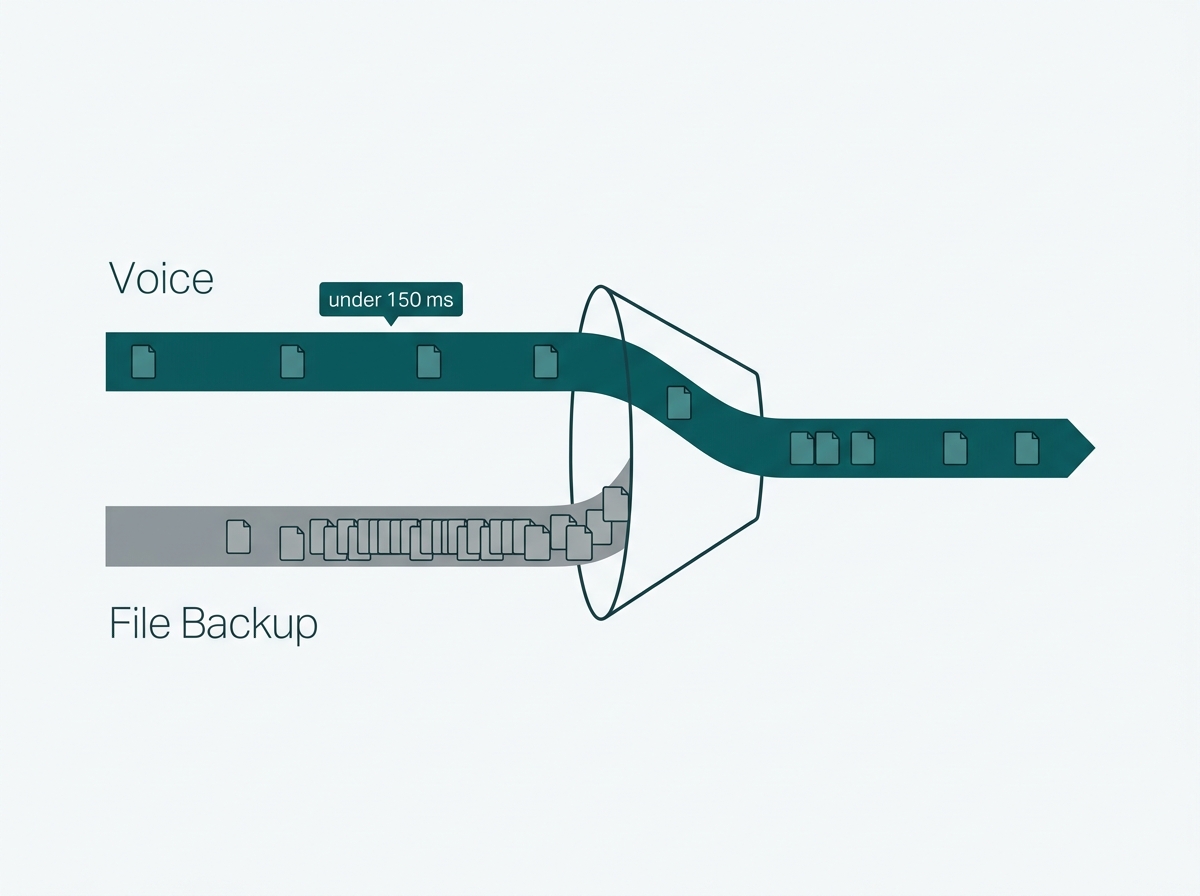
Voice traffic is sensitive to delay in a way that file downloads are not, and the tolerance is measurable. ITU-T Recommendation G.114, the international standard for one-way transmission time, holds that keeping mouth-to-ear delay under 150 milliseconds lets most applications feel essentially transparent to the user, while delay above 400 milliseconds is treated as unacceptable for network planning purposes.
A managed switch's QoS settings flag VoIP packets as high priority so they hold that budget, even while a large file transfer or an overnight backup running late competes for the same link.
An unmanaged switch treats every packet identically, first in and first out, regardless of what it carries. On a quiet network, that costs nothing. On a busy one, it is why calls stutter at the same time every day.
Per-Port visibility turns troubleshooting from a guess into a lookup
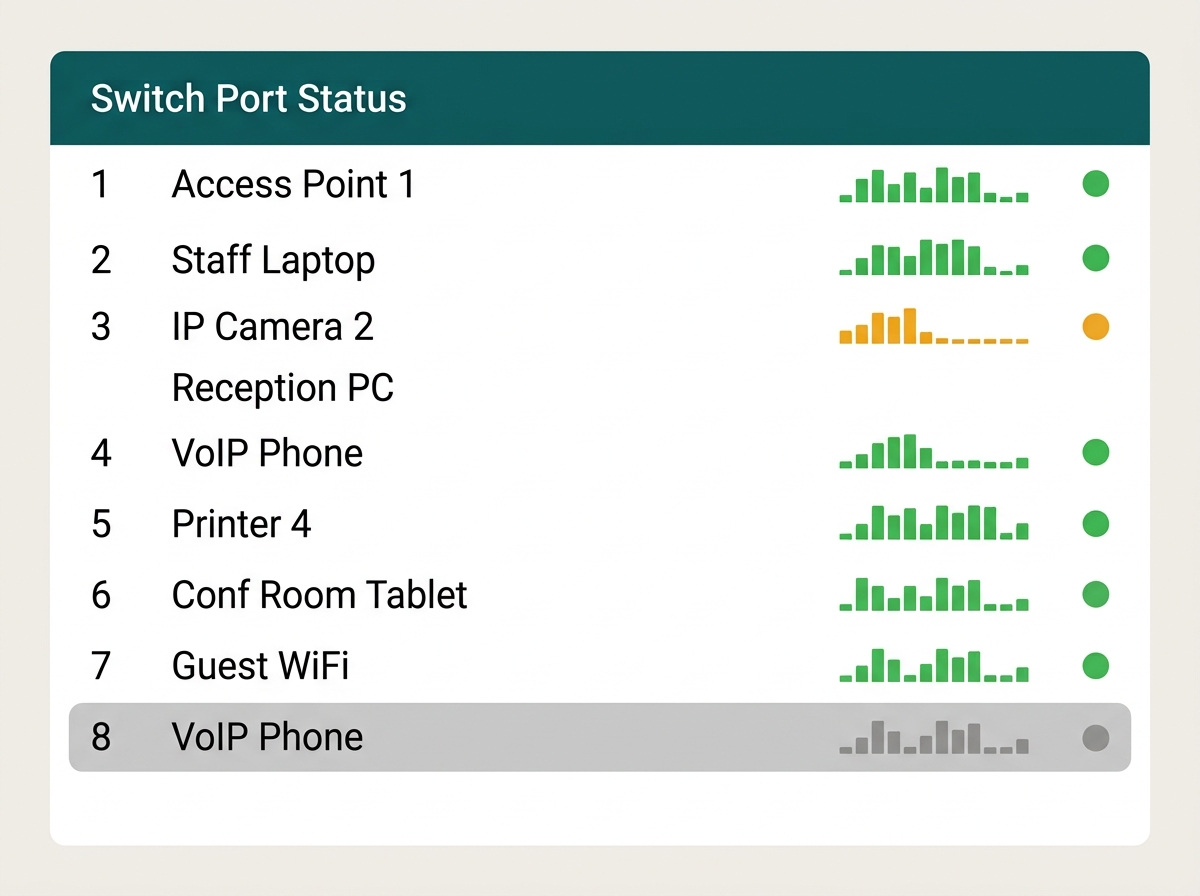
When something goes wrong on an unmanaged network, the only diagnostic tool available is unplugging cables one at a time and watching what changes. A managed switch shows which port is active, how much traffic is passing through it, and whether a connected device has dropped offline.
What it means for you: these three capabilities are the actual purchase decision. If none of them describes a problem the network has or is about to have, the managed switch is not yet earning its price.
For a closer look at where switches fit alongside the rest of the network, see how a network switch works with routers and access points and how to keep the physical installation organized once VLANs are in place.
Where Does a Smart Switch Fit Between the Two?
A smart switch offers VLAN and QoS configuration through a simplified web interface, without the command-line access, port-based authentication, or routing features a fully managed switch carries.
The boundary is more specific than most comparisons admit, and Omada's published range shows exactly where it falls. Its Agile tier, the smart or easy-managed category, includes VLAN, QoS, loop prevention, flow control, and cloud management. It does not include access control lists, 802.1X, SNMP, or command-line access, and it does not include static routing, DHCP server, or IP interface functions. Fully managed tiers from Access upward carry all of those.
That matters because the two capabilities most small businesses actually need, separating guest traffic and prioritizing voice, both sit on the smart side of the line. The features on the managed side are largely about authenticating devices, writing granular traffic rules, and routing between segments without a separate gateway.
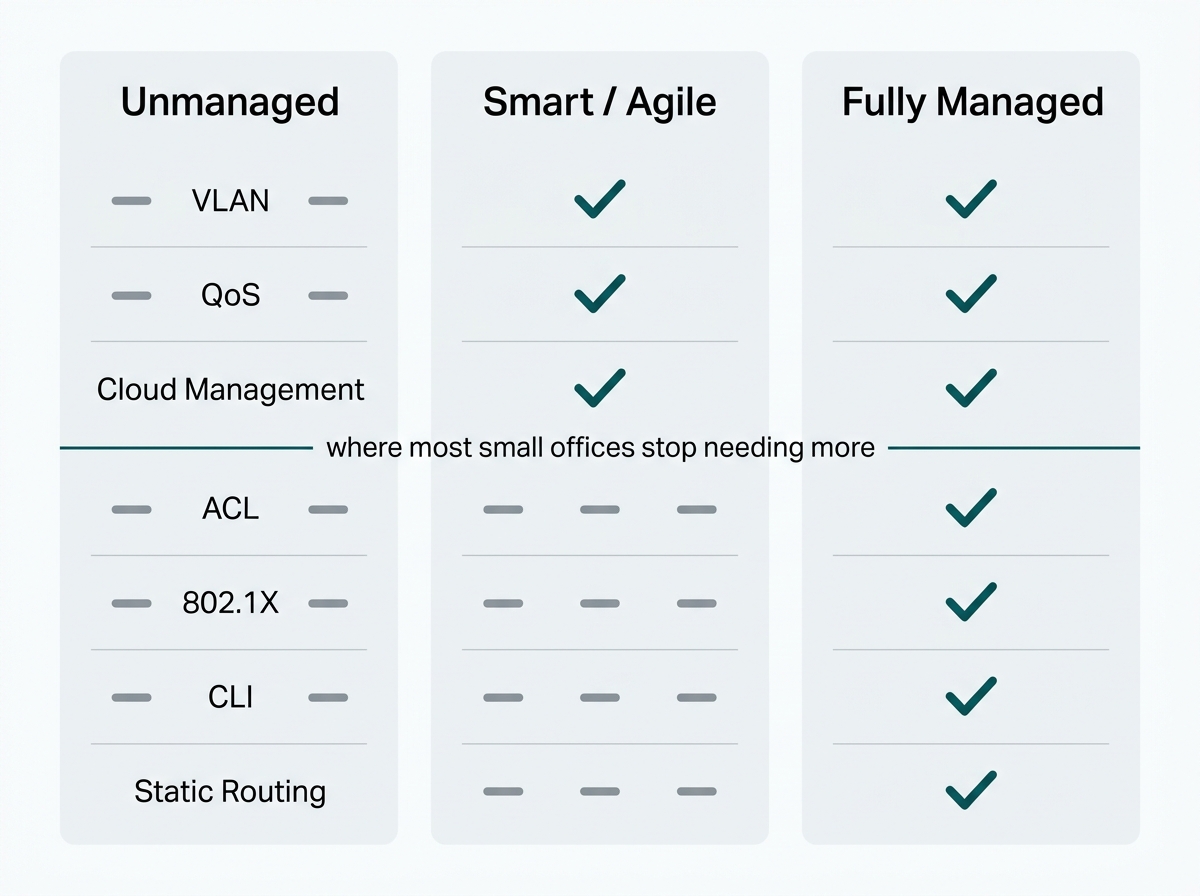
What it means for you: if the requirement is to keep guests off the staff network and keep calls clean, a smart switch is often the honest answer rather than the cheap compromise. If you need to authenticate every device that plugs into a wall port, you have crossed into managed territory.
Why Do So Many Managed Switches End Up Running as Unmanaged Ones?
The most common segmentation failure is not buying the wrong switch. It is buying the right one and never configuring the VLANs it was bought for.
This turns up repeatedly in network audits. A business installs a fully capable managed switch, and the VLANs never get assigned, because the interface and the terminology feel more technical than a general IT hire is comfortable with. The switch sits in the rack forwarding everything on a single flat network, exactly as an unmanaged switch would, while the segmentation and prioritization it was purchased for stay switched off.
Nothing looks wrong, because a flat network still passes traffic normally. It surfaces only when something goes wrong, or when someone compares what the segmentation actually looks like against what the purchase order assumed.
The cost of that gap is specific rather than vague. A business that buys into a fully managed tier is paying for access control lists, 802.1X, SNMP, and command-line access on top of the VLAN and QoS features a smart switch would have given it. If the VLANs are never configured, none of that is in use, and the business has paid the fully managed premium for hardware performing below what the entry-level Agile tier would have delivered configured.
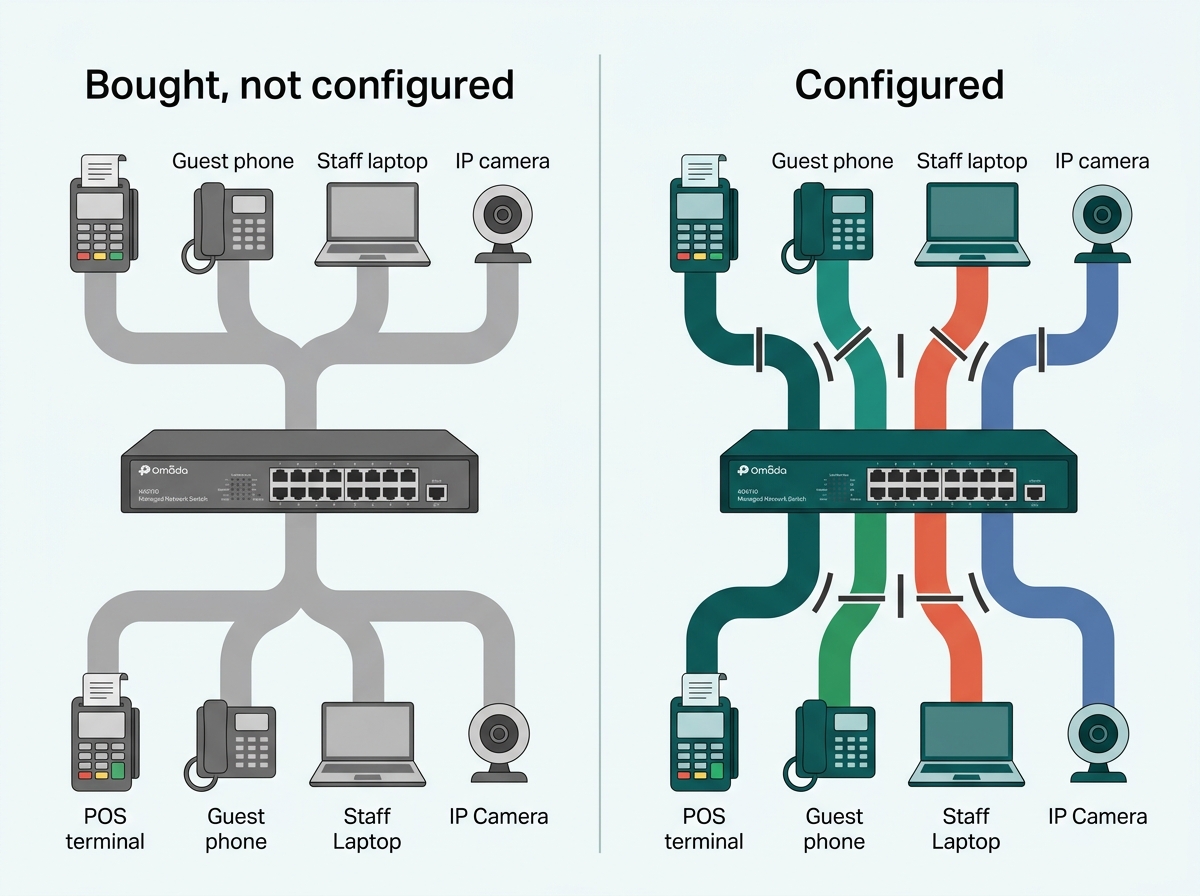
What it means for you: before budgeting for a managed switch, decide who configures it and when. If that answer is unclear, either budget for the setup work or choose a smart switch with an interface that matches the skill actually available.
Centralized, template-driven configuration helps here, since VLAN settings pushed from a controller across every site at once are much harder to quietly skip than settings applied device by device.
How Should Cost Factor Into the Decision?
A managed switch costs more per port than an unmanaged equivalent, and the gap widens with more advanced security and routing features. Hardware price on its own is not a useful comparison.
The other side of it is what the network carries and what a problem on that network would cost to find and fix. An unmanaged network with a security or performance issue gets diagnosed by trial and error, which consumes technician time that per-port monitoring would have made unnecessary. Whether that tips the decision depends entirely on the business. For a network carrying payments, voice, or customer data, being unable to see what is happening on it is a different order of problem than it is for general office traffic.
What it means for you: compare the price gap against what an hour of network downtime costs your specific operation. That figure, not the switch price, is what makes the decision obvious in either direction.
To see the managed switch options built for centralized, cloud-based configuration, explore Omada managed switches.
Frequently Asked Questions
What is the main difference between a managed and unmanaged switch?
A managed switch can be configured, monitored, and segmented into VLANs, while an unmanaged switch forwards traffic between connected devices with no configuration options at all. The practical difference appears once a network needs to separate traffic types or diagnose a fault remotely.
Do I need a managed switch for a small office?
Not necessarily. A small office with a handful of devices and no need to separate guest, staff, or device traffic runs fine on an unmanaged switch. Once guest Wi-Fi, VoIP, or security cameras join the same network, a managed or smart switch becomes worth the cost.
Do I need a managed switch to power IP cameras or access points over PoE?
No. Power over Ethernet is available on unmanaged switches as well, with PoE++ output and PoE budgets reaching 250W on Omada's unmanaged range, which is enough for a typical small camera or access point deployment. The reason to choose a managed switch for cameras is to keep them on their own isolated segment and be able to see when one drops offline, not power them.
What is a smart managed switch, and how is it different from a fully managed switch?
A smart managed switch offers VLAN, QoS, loop prevention, and cloud management through a simplified web interface. A fully managed switch adds access control lists, 802.1X authentication, SNMP, command-line access, and routing functions such as static routing and a DHCP server. Smart switches suit businesses that need traffic separation without device-level authentication or inter-VLAN routing.
Can I mix managed and unmanaged switches on the same network?
Yes. It is common to run a managed switch at the network core to handle VLANs and traffic prioritization, with unmanaged switches extending simple connectivity into lower-stakes areas such as a break room or storage closet.
How much more does a managed switch cost than an unmanaged one?
Managed switches cost more per port than unmanaged equivalents, and the gap widens for models with advanced security or routing features. Whether that gap is worth paying depends on what the network carries and what a period of downtime or an undiagnosed fault would cost that specific business.
Does a managed switch require ongoing maintenance?
Some, though cloud-managed switches, reduce it considerably. Initial VLAN and QoS setup takes the most effort, and after that, most day-to-day monitoring happens through a dashboard rather than hands-on work.
Final Thoughts
The choice between managed and unmanaged switches comes down to one question: does this network need to separate, prioritize, or monitor its traffic? A single-room setup with a handful of devices rarely does. An office running guest Wi-Fi, VoIP, security cameras, or more than one department on the same physical network almost always does, whether that need is obvious yet or not.
Getting the hardware right is only half the job. A managed switch that never gets its VLANs configured delivers none of the separation it was bought for, which is why the setup step deserves as much planning as the purchase. To see managed switch options built for centralized, cloud-based configuration, explore Omada managed switches.