


VLAN Configuration Explained: Tagging, Ports, and Management VLANs
Published: August 4, 2026 | Last Updated: August 4, 2026
Quick Answer
- VLANs work by tagging. The switch tags frames with a VLAN ID as they cross links between switches, and strips the tag before delivering to the end device, so a laptop or camera never knows a VLAN exists.
- Configuration is five steps: create the VLAN, assign ports, set DHCP and addressing, decide what may route between VLANs, then test that isolation actually holds.
- The commonly skipped one is the management VLAN. By default, only untagged and VLAN 1 frames reach an Omada device, which means the administration interface sits on the same VLAN as general traffic until someone moves it.
A VLAN divides one physical network into multiple isolated logical networks using switch configuration rather than separate cabling. Devices on the same VLAN communicate as though they shared a private switch, and devices on different VLANs cannot reach each other at all unless a router or Layer 3 switch is explicitly configured to permit it. That is what lets one switch carry guest Wi-Fi, staff devices, cameras, and payment systems without any of them seeing each other's traffic.
Table of Contents
What Is the Difference Between an Access Port and a Trunk Port?
Should You Use Static or Dynamic VLANs?
What Is a Management VLAN and Why Is It Skipped?
What Is the Difference Between a VLAN and a Subnet?
What Is a VLAN?
A VLAN, or Virtual Local Area Network, divides one physical network into multiple isolated broadcast domains through switch configuration instead of separate physical wiring.
Devices on the same VLAN behave as if they shared a private switch, even when they are plugged into the same hardware as devices on a completely different VLAN. Devices on different VLANs cannot communicate directly at all unless a router or Layer 3 switch is explicitly configured to allow it.
Guest Wi-Fi, staff devices, security cameras, and point-of-sale systems commonly run through the same switch. Without separation, a guest device sits on the same network as the payment terminal and shares its broadcast traffic, which nobody intended and nobody notices. VLANs fix that without buying more hardware, though they do require a managed or smart switch, since an unmanaged switch has no VLAN support at all. Our guide to managed switches differs from unmanaged ones and covers where that line falls.
What it means for you: VLANs are a configuration exercise, not a purchase, provided your switch supports them. The cost is planning time.
How Does VLAN Tagging Work?
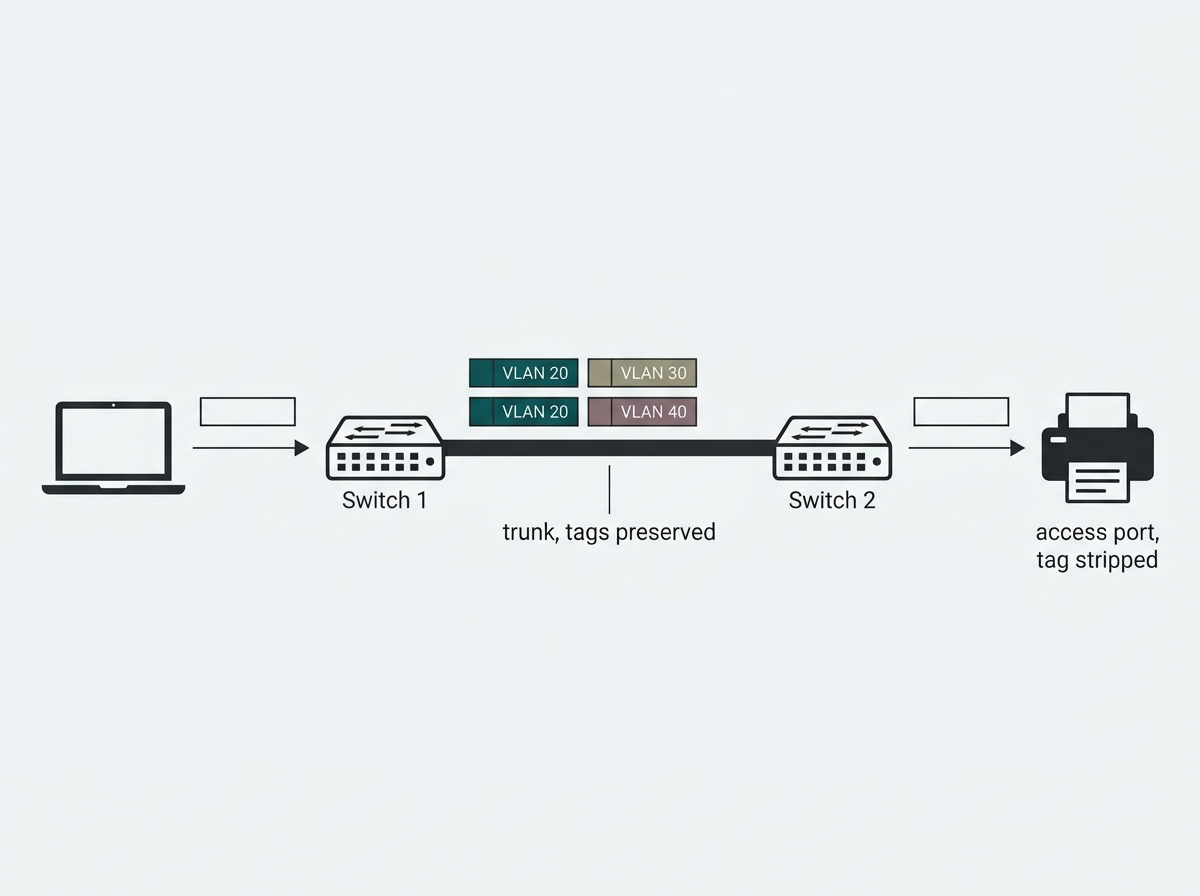
Each VLAN is identified by a 12-bit VLAN ID, a number from 1 to 4094, defined under the IEEE 802.1Q standard. The switch checks which VLAN a port belongs to and tags frames accordingly as they cross the links between switches.
Access ports, where end devices like a laptop or printer physically connect, strip that tag before delivering the frame. An individual computer or camera never has to know a VLAN exists. The tagging and stripping happen entirely at the switch, which is why VLANs need no configuration on the devices themselves.
What it means for you: you do not configure VLANs on laptops, printers, or cameras. If a vendor tells you endpoint configuration is required for basic VLAN separation, ask why.
What Is the Difference Between an Access Port and a Trunk Port?
An access port carries traffic for exactly one VLAN and is where end devices connect. A trunk port carries traffic for multiple VLANs at once between switches, keeping each VLAN's traffic tagged and distinct across that shared link.
Getting this wrong is among the most common VLAN misconfigurations. Applying a trunk configuration to a port with an end device plugged into it typically shows up as a device that links up but cannot reach the network properly, which is a confusing symptom because the physical connection looks healthy.
Worth knowing before you start: the Omada controller does not use the words access port and trunk port. It works in profiles and PVID. When you create a network, a profile with a matching PVID is generated automatically, and you apply that profile to a port. Whether traffic leaves tagged or untagged is set through Network Tags rather than by declaring the port's type. The concepts map directly, but the labels differ, so a reader hunting for a trunk setting in the interface will not find one.
What it means for you: learn both vocabularies. The generic one is what documentation and search results use, and the Omada one is what the screen in front of you says.
Should You Use Static or Dynamic VLANs?
Static VLANs assign a device to a VLAN based on which physical port it plugs into, and the assignment stays until someone changes it. Dynamic VLANs assign membership from the device's identity instead, using its MAC address or user credentials, so a laptop keeps its VLAN wherever it connects.
Static covers the large majority of small and mid-sized business needs, because desks and devices do not move often enough to justify the extra machinery. Dynamic earns its complexity in environments with hot-desking, frequent desk changes, or a substantial mobile workforce, and it is also what pairs with 802.1X authentication so a device lands in the right VLAN based on who it proved itself to be rather than which jack it used.
What it means for you: start static. Move to dynamic when you find yourself re-patching ports to move people, not before.
How Do You Configure a VLAN?
The sequence is the same regardless of vendor, with the Omada equivalents noted alongside.
- Create the VLAN and give it an ID. This defines it as a distinct broadcast domain. In Omada, this is creating a network under Settings, Wired Networks, and a profile carrying the matching PVID is generated for you automatically.
- Assign ports. Each access port carries one VLAN, and trunk ports carry several between switches. In Omada, you apply the relevant profile to each port and use Network Tags to control what leaves tagged or untagged.
- Configure DHCP and IP addressing. Each VLAN normally gets its own subnet, so a device's IP address itself identifies which segment it belongs to.
- Decide what may route between VLANs. By default, VLANs are fully isolated. A router or Layer 3 switch with explicit rules is what permits any traffic to cross, and every path you open should be a deliberate exception.
- Test the isolation. Confirm a device in one VLAN genuinely cannot reach a device in another unless you configured that path. A VLAN that was created but never verified is the most common way this work looks finished without being finished.
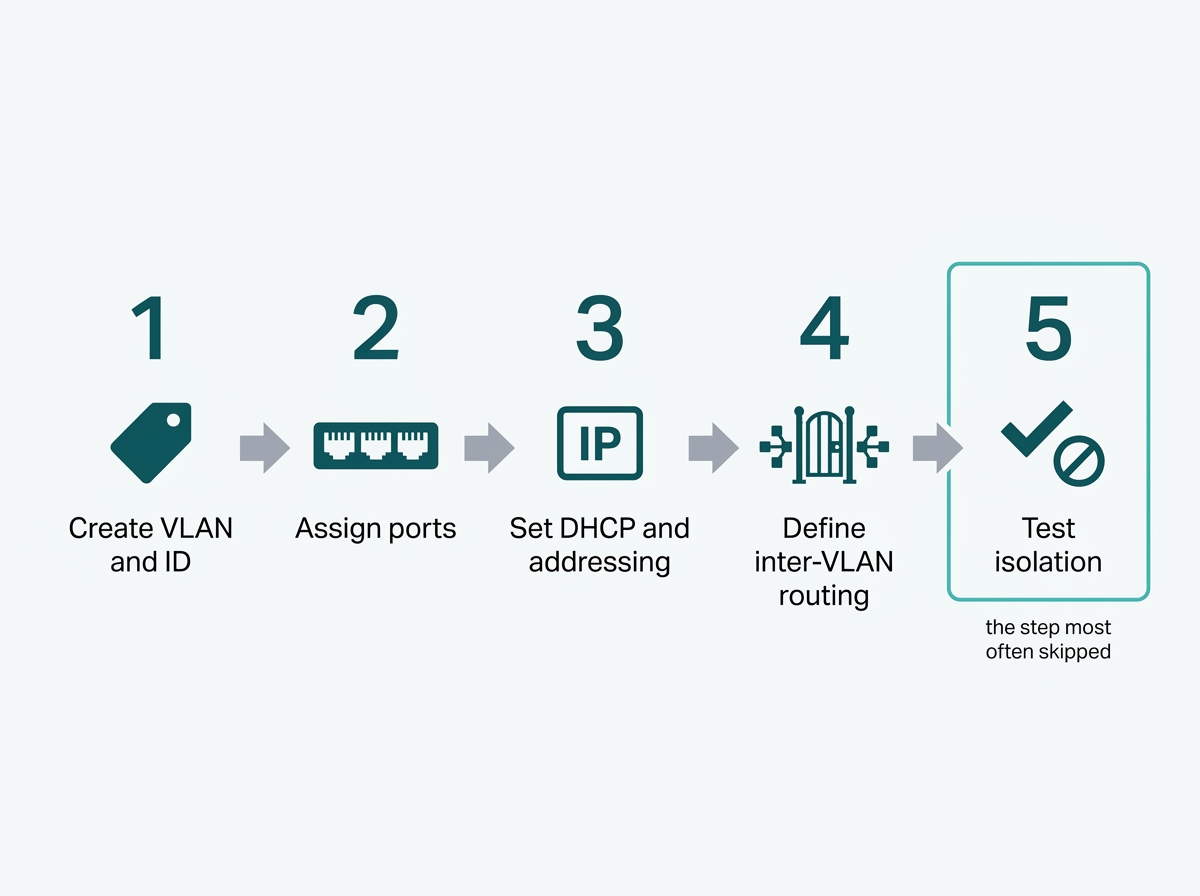
What it means for you: budget time for step five specifically. Steps one through four produce something that looks configured, and only step five tells you whether it is.
What Is a Management VLAN and Why Is It Skipped?
A management VLAN carries only the traffic used to configure and monitor the network devices themselves, separated from user traffic. Without one, anyone who reaches the general network can also reach the switch and access point administration interfaces.
It gets skipped because most VLAN planning is about separating guest Wi-Fi, staff devices, and cameras from each other, and management traffic is not something a user ever notices. There is also a mechanical reason it is easy to miss. In default mode, only untagged and VLAN 1 frames can communicate with an Omada device, which means device management sits on VLAN 1 alongside general traffic until somebody deliberately moves it. Nothing appears wrong, because nothing is broken.
Moving it is a two-part job. You create a network for management; Omada's own worked example uses VLAN 4090, and then enable Management VLAN on the devices themselves under Config, Services, applying it in batches rather than device by device. Set a DHCP reservation for the controller inside that VLAN so it keeps a predictable address. On Omada Controller v6.0 and above, you can go further and give switches and access points separate management VLANs, with clients on their own VLAN off VLAN 1 entirely: Omada's documented example runs clients on VLAN 20, switch management on VLAN 30 and AP management on VLAN 40.
Two caveats decide whether this applies to you at all. If you run the Omada Cloud-Based Controller, you do not need to configure a management VLAN, because management data is already separated from user data and no user data passes through the cloud. The Omada Gateway does not support changing its management VLAN, so a plan that assumes every device can be moved will stop at the gateway.
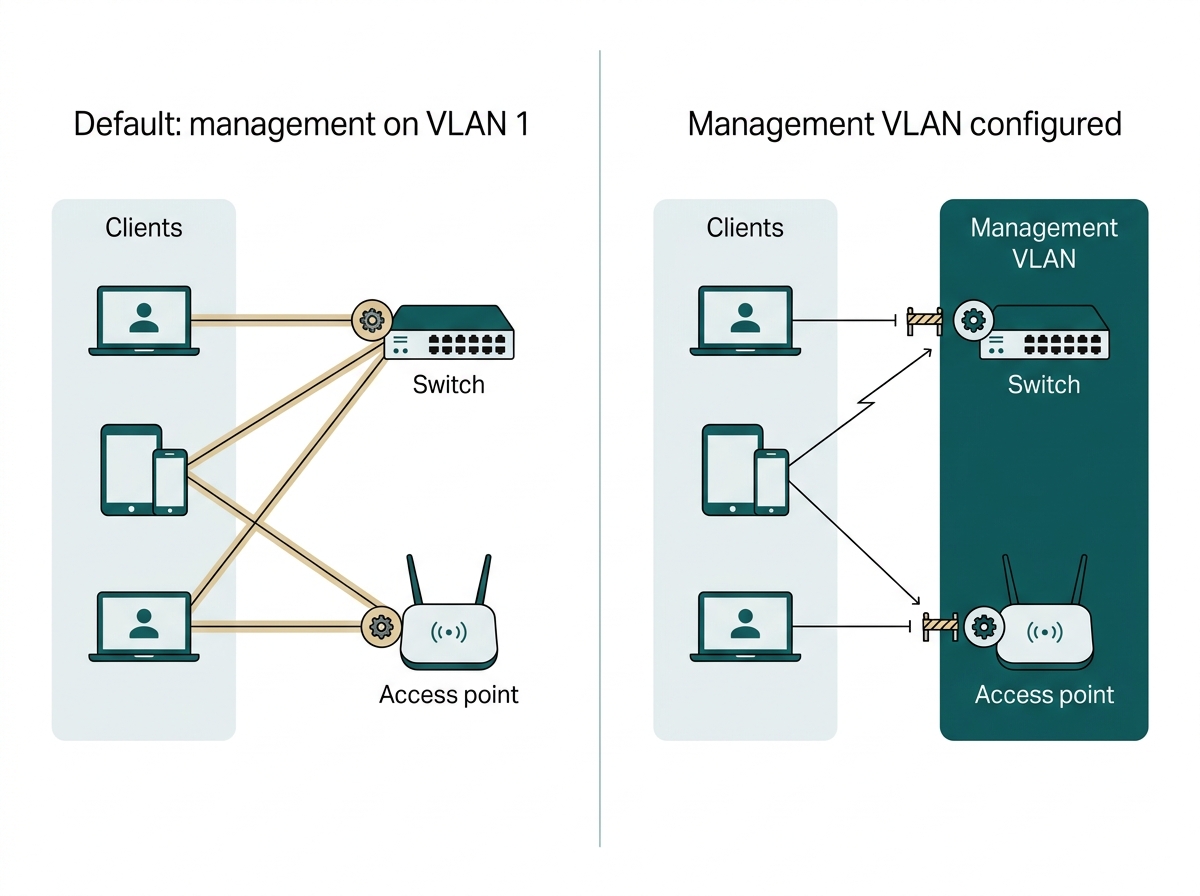
What it means for you: if you run a hardware or software controller, this is the gap worth closing first, ahead of any further user-facing VLAN. If you run the cloud controller, skip it and spend the time elsewhere.
What Is the Difference Between a VLAN and a Subnet?
A VLAN operates at Layer 2 and defines a logical broadcast domain through switch configuration. A subnet operates at Layer 3 and defines a range of IP addresses. They solve different layers of the same problem.
In practice, each VLAN is almost always paired with its own subnet, so that addressing reflects segmentation and a device's segment can be identified from its IP address alone during troubleshooting. They are configured together, and confusing one for the other is what leads to a VLAN that exists on the switch while every device still draws an address from the same pool.
How this fits the larger picture, including which zones are worth creating in the first place, is covered in our network segmentation strategy guide. To see how the controller VLANs are configured, explore Omada SDN controllers.
What it means for you: if two VLANs share a subnet, something is misconfigured. The addressing should let you name the segment from the IP alone.
Frequently Asked Questions
What is the difference between a VLAN and a subnet?
A VLAN is a Layer 2 concept creating a logical broadcast domain through switch configuration. A subnet is a Layer 3 concept defining a range of IP addresses. In practice, each VLAN is paired with its own subnet so that addressing reflects the segmentation.
Do I need a managed switch to configure VLANs?
Yes. VLAN tagging and port assignment require a managed or smart-managed switch. An unmanaged switch has no configuration interface and cannot create or enforce VLAN boundaries.
Can devices on different VLANs communicate with each other?
Not by default. Devices on different VLANs are isolated unless a router or Layer 3 switch is explicitly configured with rules allowing specific traffic to pass between them.
What is a management VLAN and why does it matter?
A management VLAN separates the traffic used to configure and monitor network devices from general user traffic. It matters because, by default, only untagged and VLAN 1 frames reach an Omada device, so the administration interfaces sit alongside general traffic until the management VLAN is configured.
Do I need a management VLAN if I use the Omada Cloud-Based Controller?
No. Omada states that the Cloud-Based Controller already separates management data from user data, with no user data passing through the cloud, so a management VLAN is not required. It remains worth configuring on hardware and software controllers.
What is the difference between an access port and a trunk port?
An access port carries traffic for one VLAN and is where end devices connect. A trunk port carries traffic for multiple VLANs between switches, keeping each VLAN's traffic tagged and separate across that link. In the Omada controller, these are expressed as profiles with a PVID and Network Tags rather than as port types.
How many VLANs does a small business need?
There is no fixed number, and it depends on how many traffic types genuinely need separating. A common starting point is staff devices, guest Wi-Fi, and a third for cameras or point-of-sale systems, plus a management VLAN where the controller requires one.
Final Thoughts
VLAN configuration turns one physical network into several logically separate ones without running additional cabling. The mechanism is not complicated: create the VLAN, assign ports, give each segment its own addressing, permit only the traffic that has to cross between them, and then verify the isolation actually holds.
The gap that shows up most often is not in the guest or staff VLANs that get planned. It is the management VLAN nobody planned, which leaves the network's own administration interfaces sitting on VLAN 1 alongside everything else. On a hardware or software controller, that is worth closing before any further user-facing segmentation. On the cloud controller, it is already handled.
If you are planning VLANs from scratch, the fastest way to get a workable design is to write down every traffic type on your network, mark which ones must never reach each other, and note which controller you run. Bring that to an Omada specialist, and you will get back a VLAN scheme with IDs and subnets assigned, the profile and PVID settings for each port, and a clear answer on whether a management VLAN applies to your setup. Explore Omada SDN controllers to see where networks, profiles, and management VLAN settings are configured together, and check your controller version first, since separate management VLANs for switches and access points require v6.0 or above.