


Decoのスピード制限機能の使い方
Decoに接続したデバイスのアップロード/ダウンロード
以下の手順でDecoアプリ上でスピード制限を行うことができます。
注意:
- Decoの機種・ファームウェアによって設定手順や画面構成などが異なる場合があります。
- スマートフォンのOSによって若干画面構成が異なります。
1. Decoアプリを起動し、クライアントを表示し接続している端末を確認します。

2. 制限をしたいデバイスを選択し、スピード制限をタップします。Speed Limit.

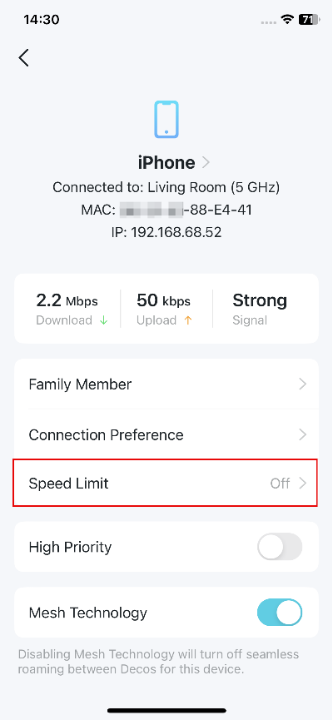
3. スピード制限をオンにし、上限速度を指定します。


4. 保存をタップして完了です。
Looking For More
このFAQは役に立ちましたか?
サイトの利便性向上にご協力ください。
_Overview_normal_20211225093625r.png)



TP-Link Community
Still need help? Search for answers, ask questions, and get help from TP-Link experts and other users around the world.