Wi-Fi 6 vs. Wi-Fi 7: What's the Difference?
Wi-Fi 6 and Wi-Fi 7 are both capable wireless standards for a business network, but they solve different problems. Wi-Fi 6 (802.11ax) was built for density and efficiency, handling many devices simultaneously without congestion. Wi-Fi 7 (802.11be) pushes the ceiling higher on throughput and introduces Multi-Link Operation (MLO), a fundamentally new way for devices to connect across multiple frequency bands at once. Understanding the Wi-Fi 6 vs. Wi-Fi 7 differences helps clarify which standard makes sense for your next deployment or upgrade cycle.

The comparison below outlines the key technical distinctions between Wi-Fi 6 and Wi-Fi 7.
|
|
Wi-Fi 6 |
Wi-Fi 7 |
|
Standard |
IEEE 802.11ax |
IEEE 802.11be |
|
Max theoretical speed |
9.6 Gbps |
46 Gbps |
|
Max channel width |
160 MHz |
320 MHz |
|
Frequency bands |
2.4 GHz, 5 GHz (6 GHz with Wi-Fi 6E) |
2.4 GHz, 5 GHz, 6 GHz |
|
Key new features |
OFDMA, 8×8 MU-MIMO, TWT, BSS Coloring, optional Preamble Puncturing |
MLO, 4096-QAM, Multi-RU, enhanced Preamble Puncturing |
|
Best for |
Most SMB deployments; strong device ecosystem |
High-density, latency-sensitive, future-ready builds |
Key Takeaways
-
Wi-Fi 7 raises the theoretical throughput ceiling from 9.6 Gbps (Wi-Fi 6) to 46 Gbps, driven by 320 MHz channel width and 4096-QAM modulation.
-
Multi-Link Operation (MLO) is Wi-Fi 7's most impactful new feature for business environments: it lets devices transmit across multiple bands simultaneously, reducing latency and improving connection reliability.
-
Wi-Fi 6 is a practical choice for most SMB deployments today due to cost, device ecosystem maturity, and infrastructure compatibility.
-
Wi-Fi 7 requires multi-gigabit switching infrastructure — typically 2.5G or 10G uplinks — to deliver its full throughput potential.
-
The upgrade decision hinges on three factors: your client device compatibility, your switching infrastructure, and the expected hardware lifecycle of your deployment.
What Is Wi-Fi 6?
Wi-Fi 6 (802.11ax) is the sixth generation of the Wi-Fi standard, ratified in 2019. It operates across the 2.4 GHz and 5 GHz bands, with Wi-Fi 6E extending that to the 6 GHz band. Wi-Fi 6 was designed specifically for environments with high device counts, using OFDMA and 8×8 MU-MIMO to serve multiple clients simultaneously without degrading performance.
Pros
-
Strong device compatibility across laptops, smartphones, and IoT hardware
-
Efficient airtime management through OFDMA reduces congestion in dense environments
-
Target Wake Time (TWT) extends battery life on connected devices
-
Mature ecosystem with broad access point availability
Cons
-
Maximum 160 MHz channel width limits peak throughput compared to Wi-Fi 7
-
No native multi-band link aggregation — devices connect to one band at a time
-
6 GHz access requires Wi-Fi 6E hardware, which adds cost
Best for
Wi-Fi 6 is well-suited to offices, retail locations, hotels, and managed service provider deployments where the device base is established and the priority is reliable, high-density performance. For most SMB environments, Wi-Fi 6 delivers the capacity and consistency needed without requiring infrastructure changes to switching or cabling.
What Is Wi-Fi 7?
Wi-Fi 7 (802.11be) is the seventh generation of the Wi-Fi standard, ratified in 2024. It operates across the 2.4 GHz, 5 GHz, and 6 GHz bands, supports channel widths up to 320 MHz, and introduces Multi-Link Operation as a foundational capability. Where every prior Wi-Fi generation connected a device to a single band at a time, Wi-Fi 7 allows simultaneous connections across multiple bands, treating them as aggregated data paths.

Pros
-
MLO reduces latency and improves reliability by distributing traffic across multiple bands
-
320 MHz channels and 4096-QAM deliver significantly higher throughput than Wi-Fi 6
-
Up to 16×16 MU-MIMO doubles the spatial stream capacity of Wi-Fi 6
-
Enhanced support for Preamble Puncturing allows access points to avoid interference-affected portions of a channel rather than reducing channel width, helping preserve throughput
Cons
-
Wi-Fi 7 client device adoption is still growing, so many current devices connect at Wi-Fi 6 or Wi-Fi 6E speeds
-
Full throughput potential requires multi-gigabit switching infrastructure
-
Higher hardware cost compared to equivalent Wi-Fi 6 access points
Best for
Wi-Fi 7 suits high-density deployments such as conference centers, university campuses, large hospitality properties, and any environment running latency-sensitive applications like video conferencing or VoIP at scale. It's also the right choice when you're planning infrastructure with a longer deployment lifecycle and want to account for growing Wi-Fi 7 client device adoption.
Wi-Fi 6 vs. Wi-Fi 7 Comparison
Both standards share a foundation of OFDMA, MU-MIMO, and WPA3 security. The differences between them come down to how far each pushes throughput, spectrum efficiency, and connection architecture.
Speed
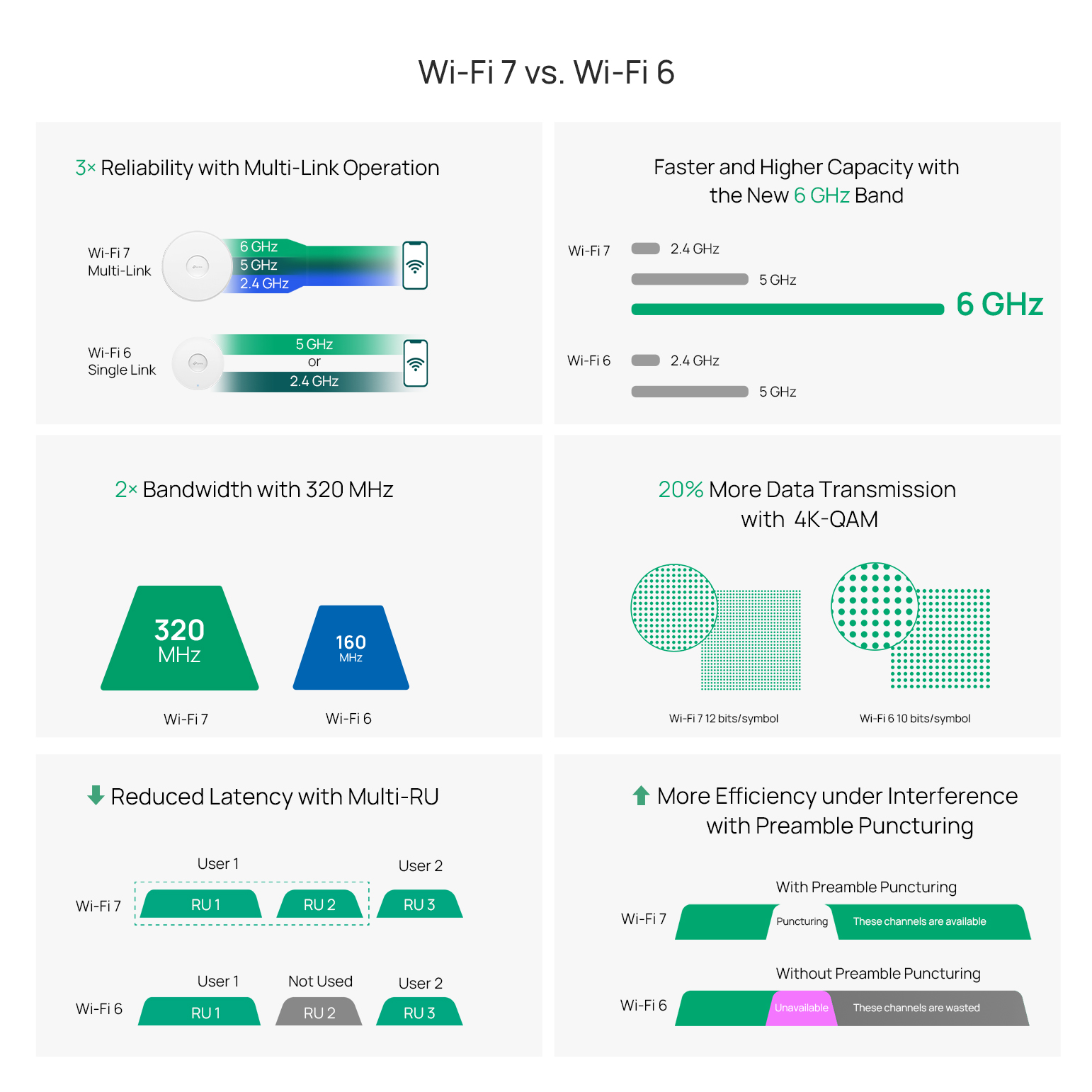
Wi-Fi 7 raises the theoretical ceiling from 9.6 Gbps to 46 Gbps, roughly a 4.8× increase. The gain comes from two compounding changes: 320 MHz channel width (double Wi-Fi 6's maximum) and 4096-QAM modulation, which carries more data per transmission than Wi-Fi 6's 1024-QAM. In practice, real-world throughput is lower than theoretical maximums, but Wi-Fi 7 sustains higher performance under load across multiple simultaneous clients.
Bandwidth
Wi-Fi 7 doubles the maximum channel width from 160 MHz to 320 MHz, and that wider channel is possible because Wi-Fi 7 operates natively in the 6 GHz band. Unlike the 2.4 GHz and 5 GHz bands — crowded with legacy traffic from years of deployed devices — the 6 GHz spectrum is largely uncongested, giving Wi-Fi 7 the room to use full 320 MHz channels in environments where that bandwidth is available.
Capacity and Efficiency
Wi-Fi 7 increases MU-MIMO support from 8×8 to 16×16, doubling the number of simultaneous spatial streams. Combined with Multi-RU allocation, which lets devices use multiple resource units within a channel rather than just one, Wi-Fi 7 distributes airtime more efficiently in device-dense environments like open offices, lecture halls, and retail floors.
Multi-Link Operation
MLO is the defining architectural change in Wi-Fi 7: devices can connect to multiple bands simultaneously and dynamically route traffic across whichever path has the least congestion. Wi-Fi 6 requires a device to pick one band and stay there until it re-associates. MLO removes that constraint, lowering latency and maintaining throughput when any single band experiences congestion, which matters most for essential applications like video conferencing, VoIP, and point-of-sale transactions.
Preamble Puncturing
Preamble Puncturing allows an access point to exclude only the congested portion of a wide channel rather than reducing the entire channel width. While the feature was introduced as an optional capability in Wi-Fi 6, Wi-Fi 7 standardizes and expands its use, allowing access points to preserve more available bandwidth when only part of a channel experiences interference. Combined with features such as Multi-RU allocation, this improves spectrum efficiency in dense wireless environments.
Which One to Choose?

Both Wi-Fi 6 and Wi-Fi 7 are capable choices. The right answer depends on your current infrastructure, device base, and deployment timeline.
Stick with Wi-Fi 6 if…
-
Your client devices are predominantly Wi-Fi 6 or earlier
-
Your switching infrastructure uses 1G uplinks and you're not planning a near-term upgrade
-
Your deployment is a standard SMB environment such as an office, restaurant, or small hospitality
-
Budget is a primary constraint and you need maximum access point coverage per dollar spent
Wi-Fi 6 continues to be the right baseline for most SMB deployments. Explore Omada's Wi-Fi access points for current Wi-Fi 6 options across indoor, outdoor, and wall-plate form factors.
Upgrade to Wi-Fi 7 if…
-
You're deploying in a high-density environment
-
Your infrastructure already includes or is being upgraded to multi-gigabit switching with 2.5G or 10G uplinks
-
Latency-sensitive applications such as VoIP, video conferencing, and real-time transactions are a primary operational requirement
-
You're planning a longer infrastructure lifecycle and want to account for growing Wi-Fi 7 device adoption
FAQs
Is Wi-Fi 7 backward compatible with Wi-Fi 6 devices?
Wi-Fi 7 access points are fully backward compatible with Wi-Fi 6, Wi-Fi 5, and earlier devices. Each device connects using the highest standard it supports, and the network handles the mix automatically without requiring separate SSIDs or manual configuration.
What is Multi-Link Operation and why does it matter for business networks?
Multi-Link Operation (MLO) is a Wi-Fi 7 feature that lets devices connect to multiple frequency bands simultaneously, and dynamically routes traffic across whichever path is least congested. For business networks, MLO reduces latency and improves reliability for real-time applications like VoIP and video conferencing, especially in settings where individual bands experience heavy traffic.
Do I need new switches to support Wi-Fi 7 access points?
In most cases, yes. Wi-Fi 7 delivers multi-gigabit throughput, and realizing its full performance potential requires switching infrastructure with 2.5G or 10G uplink ports. Without it, the switching layer limits the throughput Wi-Fi 7 can deliver.
What is the real-world speed difference between Wi-Fi 6 and Wi-Fi 7?
Theoretical maximum speeds are 9.6 Gbps for Wi-Fi 6 and 46 Gbps for Wi-Fi 7. In real-world business environments, actual throughput is lower for both — but Wi-Fi 7 consistently delivers higher performance under load, particularly in dense settings with many simultaneous clients. The practical difference is most noticeable for businesses already pushing the limits of Wi-Fi 6 capacity.
What is the difference between Wi-Fi 6, Wi-Fi 6E, and Wi-Fi 7?
Wi-Fi 6 (802.11ax) operates on the 2.4 GHz and 5 GHz bands. Wi-Fi 6E extends the same standard into the 6 GHz band, adding more available spectrum and reducing interference from legacy devices. Wi-Fi 7 (802.11be) operates natively across all three bands and adds MLO, 320 MHz channels, 4096-QAM, and other architectural improvements that go beyond the band extension Wi-Fi 6E introduced.
Is Wi-Fi 7 worth the upgrade for small business deployments today?
For most small business environments, Wi-Fi 6 remains a practical choice. Wi-Fi 7 becomes a compelling upgrade for SMBs planning new infrastructure with a longer lifecycle, operating in high-density environments, or running latency-sensitive applications at scale.