


Tapo H500 Hub as a Matter Controller and Bridge: Add and Integrate Smart Home Devices
Matter is a smart home connectivity standard that allows devices from different brands to work together. A Matter Controller acts as the hub that discovers, pairs, and controls Matter-certified devices from any brand in a smart home system. A Matter Bridge allows non-Matter devices to join Matter ecosystems.
The Tapo H500 supports both roles. It works as a Matter Controller to connect Matter-certified products, and as a Matter Bridge to integrate Tapo’s non-Matter devices into third-party Matter ecosystems, including Alexa, Google Home, Apple Home, and SmarThings.
For general questions about Tapo H500 Matter support, see the Matter Q&As for Tapo/Kasa Hubs. If you run into pairing problems, see how to fix Matter device pairing failures in the Tapo app.
Key Takeaways
- The Tapo H500 can act as a Matter Controller to add third-party Matter-certified devices (currently smart plugs and smart bulbs only) to the Tapo ecosystem via the Tapo app.
- The Tapo H500 does not support the Thread protocol, so it cannot directly add Matter devices that require Thread.
- The Tapo H500 can act as a Matter Bridge to integrate connected non-Matter Tapo sub-1G devices (such as T100, T310, T315, and S220) into third-party Matter ecosystems.
- Since the Tapo H500 does not support Bluetooth, it can only be added to third-party ecosystems via on-network discovery.
- Update Firmware to the latest version before using Matter functions, as capabilities are continually upgraded.
Using the Tapo H500 as a Matter Controller
Integrate third-party Matter-certified products into the Tapo ecosystem. The Matter Controller capabilities of the Tapo H500 will be continually upgraded. Actual usage may vary based on updates and device compatibility. Please ensure the firmware is updated to the latest version.
Check Matter Compatibility
- Supported Device Types: Currently, it only supports smart plugs and smart bulbs.
- Thread Protocol Not Supported: The Tapo H500 does not support the Thread protocol, so it cannot directly add Matter devices that require Thread.
- Pairing Methods: Tapo H500 supports commissioning third-party Matter devices via on-network discovery and Bluetooth LE through the Tapo app.
How to Add Matter Certified Devices to Tapo Smart CentralHub
Follow the instructions below to add third-party Matter devices to Tapo. Make sure the Matter device is in pairing mode — refer to the device's user manual to confirm its pairing status.
* The example below uses Bluetooth LE pairing for demonstration. The on-network discovery process may differ.
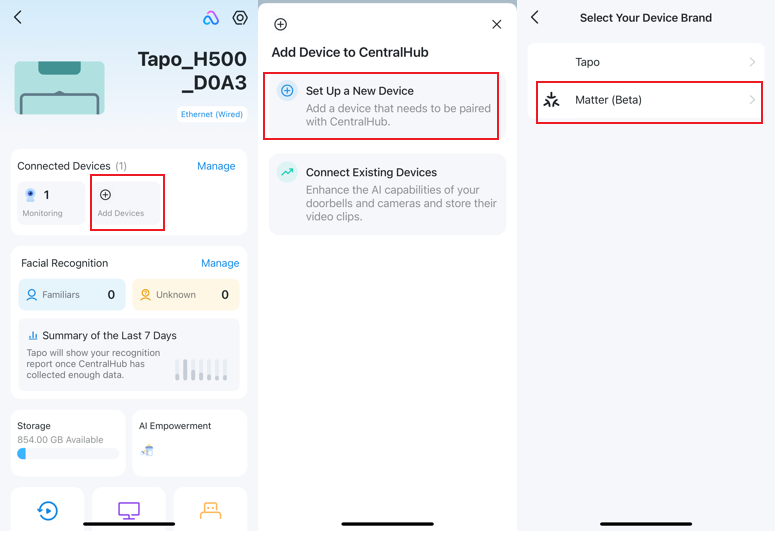
1. Tap your CentralHub in the app, and then tap Add Devices > Set Up a New Device > Matter (Beta).
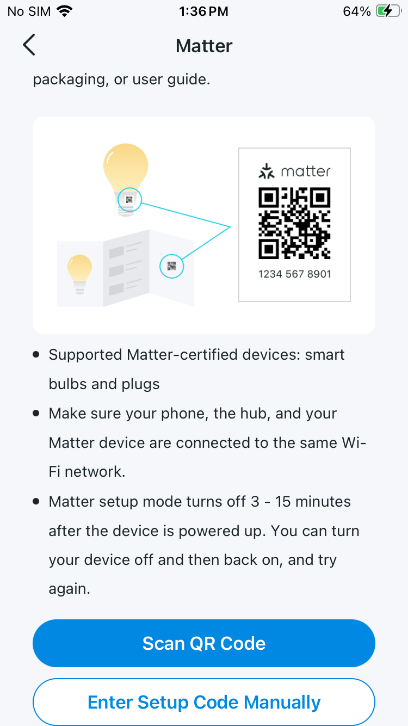
2. Tap Scan QR Code and scan the Matter Setup Code on your Matter accessory.
You can also tap Enter Setup Code Manually and enter the Matter Setup Code found on your device.
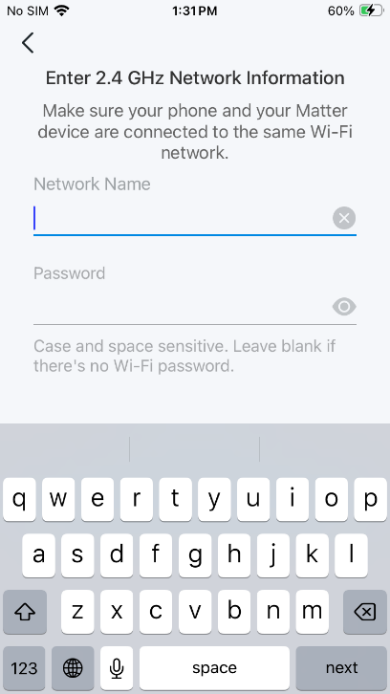
3. Enter your Wi-Fi network name and password.
4. Tapo will find nearby Matter devices. Tap Add to Tapo.
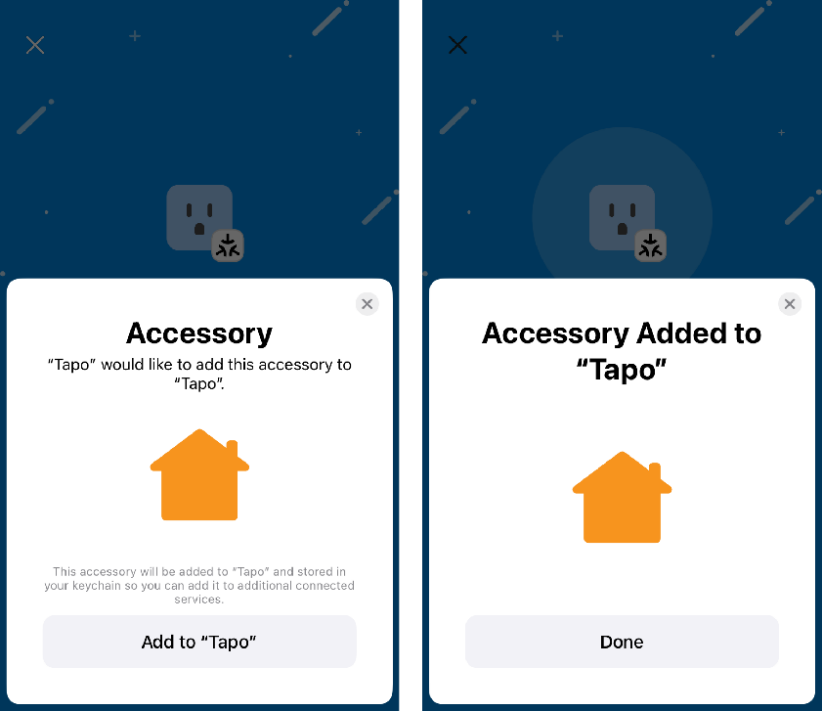
5. Name your device. Now you can control this Matter device in the Tapo app.
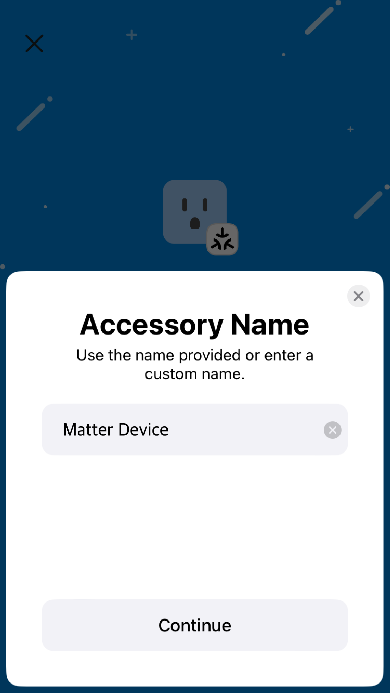
Note: Third-party devices can be found in the ‘Matter Devices’ list. Tapo Matter devices do not appear in the ‘Matter Devices’ list of the Tapo H500 CentralHub after being added via the Tapo app. However, they are visible on the main dashboard of the Tapo app.
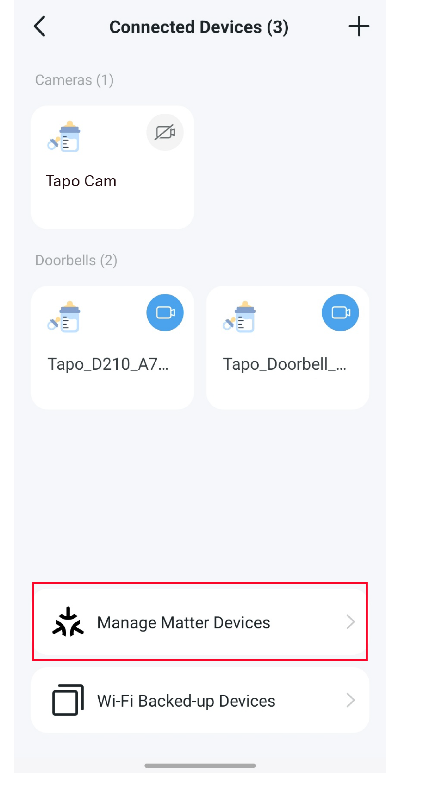
Using the Tapo H500 as a Matter Bridge
Integrate the hub’s connected non-Matter devices into other Matter-compatible ecosystems. The Matter Bridge functionality of the Tapo H500 will be continually upgraded. Please ensure the firmware is updated to the latest version.
- Third-Party Integration: Add Tapo sub-1G devices (e.g., Tapo T100/ T310/T315/S220) to third-party ecosystems via the Matter bridge of Tapo H500.
- Bluetooth LE Not Supported: Since the Tapo H500 does not support Bluetooth, it can only be added to third-party ecosystems via on-network discovery.
- Matter Controller Required: A third-party Matter Controller is required to integrate Tapo's non-Matter devices into third-party Matter ecosystems. Refer to the respective third-party websites for compatible controllers.
How to Set Up Third-Party Integration
You can add Tapo’s non-Matter devices to third-party ecosystems via the Matter Bridge of Tapo H500. Check How to set up a Matter device with Alexa, Google, Apple, or SmartThings for detailed instructions. Compatible devices will be updated continuously.
Looking for More
Is this faq useful?
Your feedback helps improve this site.


TP-Link Community
Still need help? Search for answers, ask questions, and get help from TP-Link experts and other users around the world.