Hub vs. Switch: Key Differences and How to Choose
Inherited a network closet full of aging gear, or building out a new office LAN from scratch? Either way, the hub vs. switch question is worth understanding clearly.
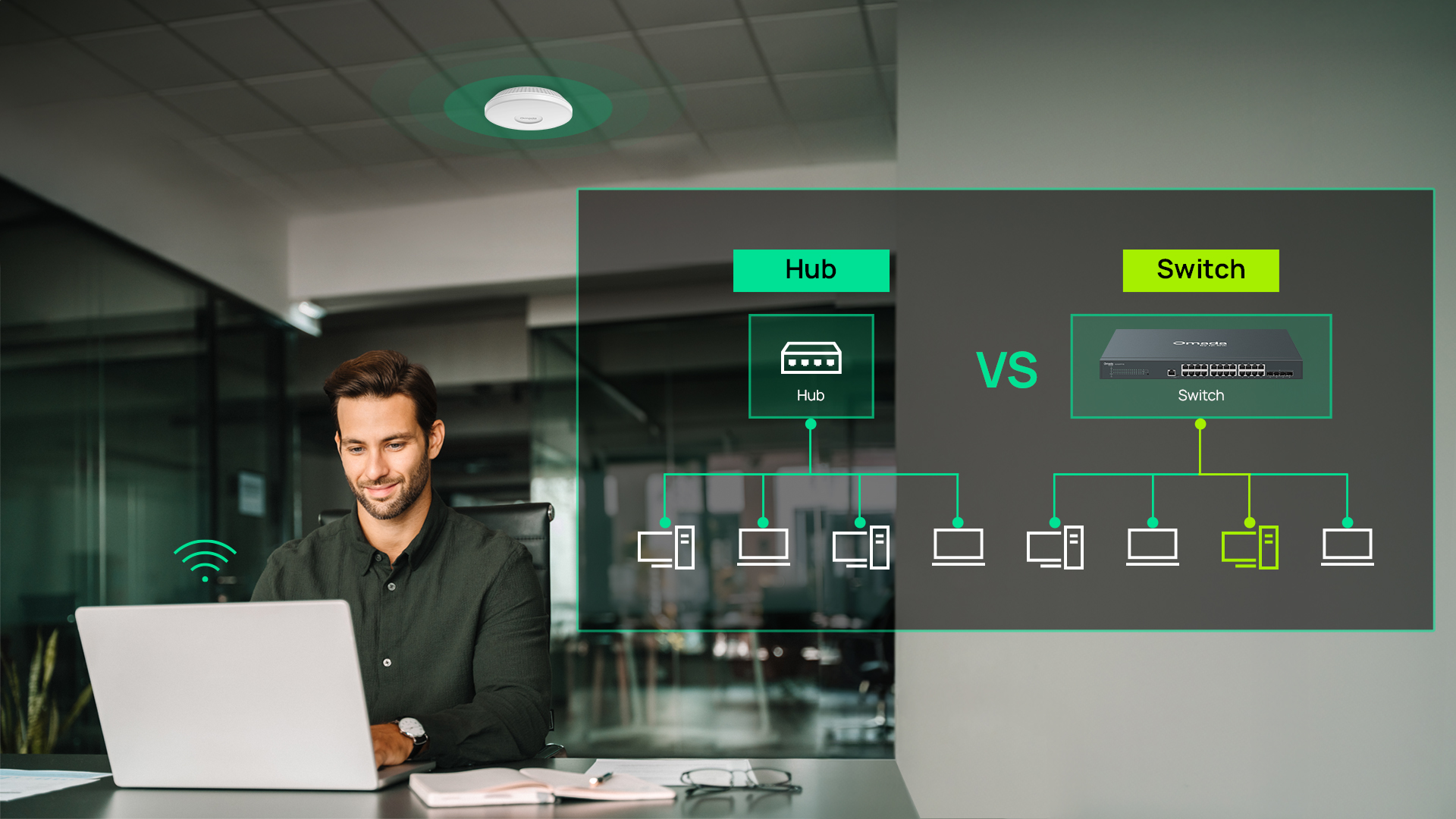
A hub broadcasts incoming packets to all ports on a shared collision domain — connected devices receive frames regardless of whether they're the intended recipient. A switch forwards each packet only to the intended destination using MAC address lookup. That architectural difference drives everything: bandwidth per device, collision behavior, security exposure, and management capability.
This article explains how each device works, the operational differences between them, and how to choose the right switch for your environment.
Key Takeaways
- A hub is a Layer 1 device that broadcasts incoming packets to every connected port, creating a single shared collision domain and a shared bandwidth pool.
- A switch is a Layer 2 device that uses MAC addresses to forward packets only to the intended destination port, with each port operating as its own collision domain at full line-rate speed.
- Hubs are effectively obsolete in new deployments; switches are the correct choice for virtually every business, home office, and home-lab network today.
- Modern networks benefit further from managed and cloud-managed switches, which add virtual local area network (VLAN) segmentation, Quality of Service (QoS), Power over Ethernet (PoE), and centralized monitoring on top of basic switching.
- Omada offers easy-managed, L2+ managed, and L3 managed switches across business and enterprise tiers, all manageable through a single Omada SDN controller.
What Is a Network Hub?
A network hub is a Layer 1 (physical layer) device that connects multiple Ethernet devices on a shared network segment. It receives an incoming signal on one port and repeats it out of every other port, regardless of which device the data is actually meant for. Hubs were common in 1990s and early 2000s LANs, but have been largely phased out as gigabit switches became widely available at comparable or lower cost.
All devices connected to a hub share the same collision domain and the same bandwidth pool. There is no intelligence in the device: it simply amplifies and repeats electrical signals.
How a Hub Works
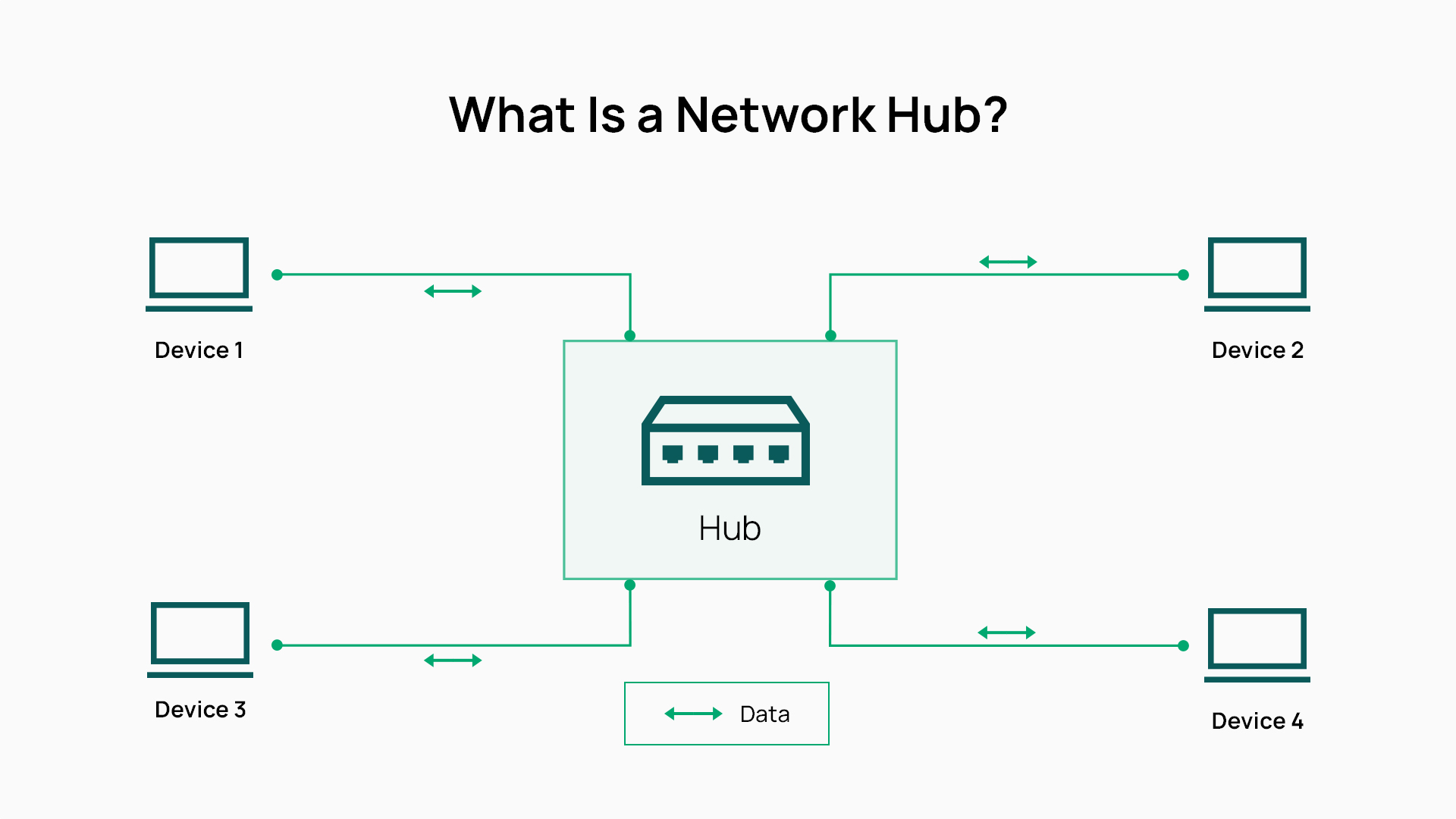
When a frame arrives on a port, the hub repeats the electrical signal out of every other port. Every device on the segment receives every frame. Only the addressed device processes it; all others discard it.
Because all devices share the same collision domain, only one device can transmit at a time. If two devices transmit simultaneously, a collision occurs, and both must stop, wait a random interval, and retransmit — a process governed by CSMA/CD (Carrier Sense Multiple Access with Collision Detection). As device count grows, collisions multiply and usable throughput drops well below the nominal link speed. A 100 Mbps hub with eight active devices delivers far less than 100 Mbps to any single sender once collisions and retransmissions are factored in. Hubs also operate in half-duplex mode, meaning a device can only send or receive at any given moment, never both at once.
Limitations of Hubs
The consequences of the broadcast model go beyond performance. Because every device sees every packet, passive sniffing requires no special access — anyone connected to the hub can capture traffic intended for another device. There is also no concept of VLANs, QoS, or port-level management. The device is entirely stateless; it cannot learn which devices are connected or make any forwarding decisions.
Hub hardware is also speed-limited. Mainstream hub products top out at 100 Mbps, and no gigabit or multi-gig hub products are currently in production. That ceiling alone makes hubs incompatible with any modern wired infrastructure.
What Is a Network Switch?
A network switch is a Layer 2 (data link layer) device that forwards Ethernet frames based on the destination MAC address. Rather than repeating every frame to every port, it delivers each frame only to the port connected to the intended recipient. Layer 3 switches extend this with IP routing capability, allowing them to perform inter-VLAN routing and replace or supplement a dedicated gateway for traffic between network segments.
How a Switch Works
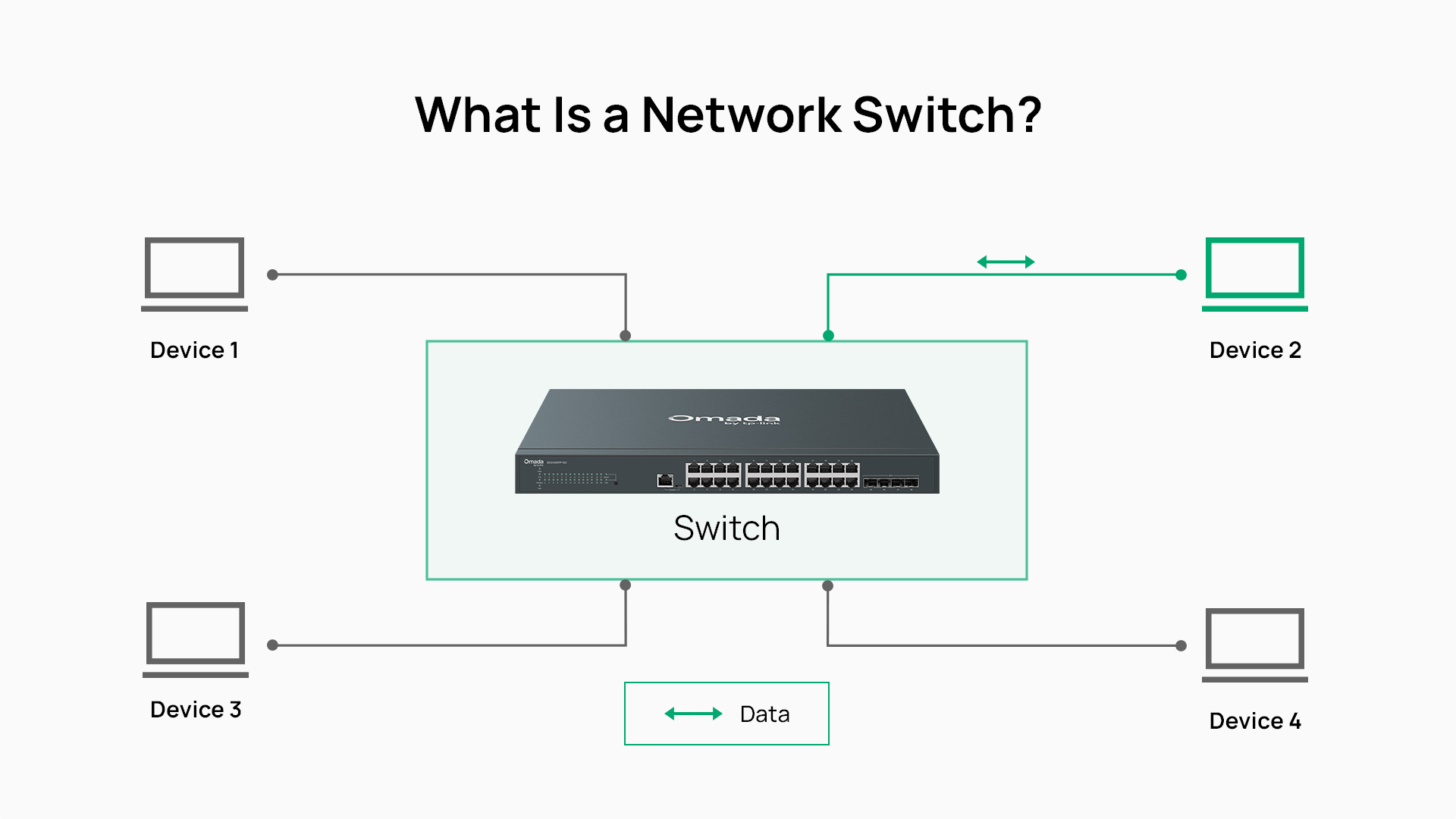
When a frame arrives on a port, the switch reads the source MAC address and records which port it came from, building a MAC address table (also called a CAM table). It then checks the destination MAC address against the table. If there is a match, the frame is forwarded only to that port. If the destination is unknown, the switch forwards the frame to all ports — but once the destination device responds, the switch learns its location and routes future traffic directly.
Each port on a switch operates as its own collision domain, which eliminates contention between devices. Switches also operate in full-duplex mode, allowing devices to send and receive simultaneously. A device connected to a gigabit switch port gets a full 1 Gbps in each direction, independent of what every other device is doing.
When a frame is addressed to a broadcast MAC address, the switch does forward it to all ports — this is standard behavior for protocols like ARP. VLANs exist partly to contain broadcast domains, limiting which devices receive those frames and preventing broadcast traffic from crossing segment boundaries unnecessarily.
Types of Switches
Switches are available in several tiers, each suited to different environments and management requirements.
- Unmanaged switches are plug-and-play devices with no configuration interface. They forward traffic based on MAC addresses without any VLAN, QoS, or access control support. They are appropriate for small, static networks where simplicity is the priority.
- Easy-managed switches, such as the Omada Agile Series, provide an affordable upgrade from unmanaged networking. They add easy-to-use configuration features like VLANs, QoS, loop prevention, and flow control, while supporting centralized management through Omada controllers. They're a good fit for small businesses that need greater visibility and control without the complexity of a fully managed deployment.
- Managed switches (L2+ and L3) provide a full CLI and GUI management surface, VLANs, ACLs, QoS, link aggregation, port mirroring, SNMP/syslog, and — on L3 models — dynamic IP routing. These are the standard for business and enterprise environments where network segmentation, security policy enforcement, and operational visibility are essential. Omada's managed switch range includes access, aggregation, and stackable L3 models with gigabit, 2.5G, 10G, and 25G options.
Hub vs. Switch: A Side-by-Side Comparison
The difference between a hub and switch is based on architecture. The table below summarizes the key operational distinctions.
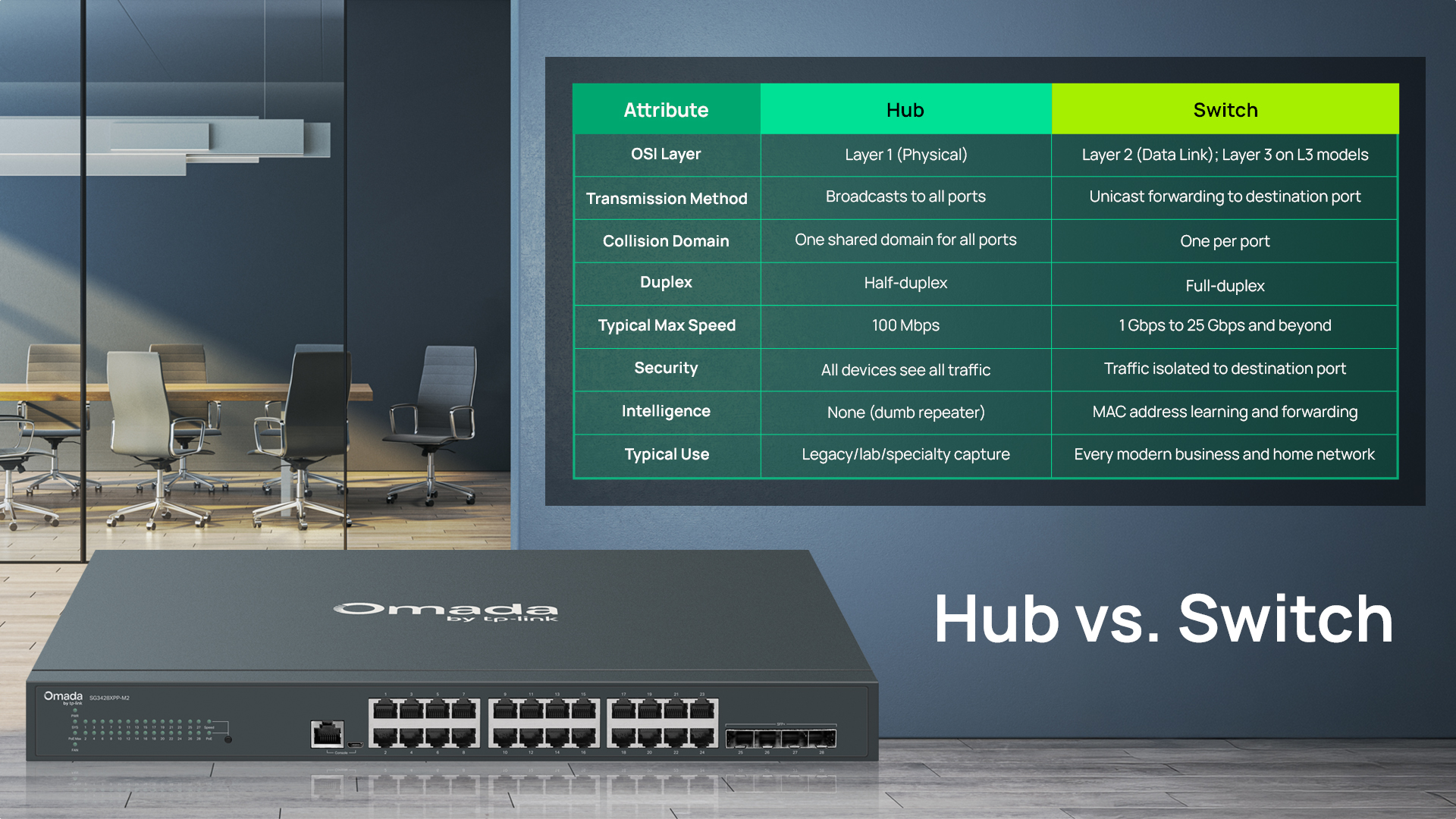
| Attribute | Hub | Switch |
|---|---|---|
| OSI Layer | Layer 1 (Physical) | Layer 2 (Data Link); Layer 3 on L3 models |
| Transmission Method | Broadcasts to all ports | Unicast forwarding to destination port |
| Collision Domain | One shared domain for all ports | One per port |
| Duplex | Half-duplex | Full-duplex |
| Typical Max Speed | 100 Mbps | 1 Gbps to 25 Gbps and beyond |
| Security | All devices see all traffic | Traffic isolated to destination port |
| Intelligence | None (dumb repeater) | MAC address learning and forwarding |
| Typical Use | Legacy/lab/specialty capture | Every modern business and home network |
Transmission: Broadcast vs. Unicast Forwarding
The practical impact of a hub's broadcast model is significant. Every packet sent by any device is delivered to every other connected device, consuming bandwidth and exposing traffic to anyone on the segment. This makes hub-based networks unsuitable for any environment where sensitive data traverses the LAN.
A switch's unicast forwarding model means that a packet addressed to Device A is only seen by Device A. Traffic between two endpoints does not consume bandwidth or expose data to other devices on the same switch.
Collision Domains and Performance
The difference between hub and switch performance comes down to collision domain design. On a hub, all connected devices share a single collision domain. As more devices transmit, collision probability increases, CSMA/CD retransmissions multiply, and aggregate throughput degrades significantly relative to nominal link speed.
On a switch, each port is its own collision domain. There is no contention between devices on separate ports. In full-duplex operation, collisions effectively do not occur on point-to-point switch links at all, which is why modern wired LANs operate reliably at line rate regardless of how many devices are connected.
Speed and Bandwidth
Hubs were produced in 10 Mbps and 100 Mbps variants. No gigabit hub products entered mainstream production, making hubs fundamentally incompatible with the bandwidth requirements of modern applications and infrastructure.
Switches begin at gigabit (1 Gbps) as the baseline, with multi-gig options — 2.5 Gbps, 10 Gbps, and 25 Gbps — available for higher-throughput environments.
For more on matching uplink speeds to downstream bandwidth requirements, see Future-Proof Your Business with Multi-Gigabit Switches.
Security
Hubs offer no security capabilities. All devices connected to a hub see all traffic, making network-level isolation or access control impossible at the switch layer. Managed switches, by contrast, isolate traffic to the destination port and add port security, ACLs, and VLAN isolation. Port security can limit which MAC addresses are permitted on a given port, preventing unauthorized device connections. ACLs allow administrators to define granular rules about which devices and VLANs can communicate with specific network resources.
Management and Features
Hubs provide no management interface and no configurability. There is nothing to log, monitor, or adjust. Managed switches offer VLANs for traffic segmentation, QoS for prioritizing latency-sensitive traffic like VoIP, link aggregation for combining multiple ports into higher-bandwidth uplinks, PoE budgeting for powering connected devices, and SNMP/syslog for monitoring and alerting. Cloud-managed switches add zero-touch provisioning and multi-site visibility through the Omada SDN controller.
When to Use a Hub vs. Switch
For virtually every production network — including small offices, home offices, schools, retail environments, and enterprise campuses — use a switch. The question is not whether to use a switch, but which type.
Why Hubs Are Effectively Obsolete
Two factors drove hubs out of production. First, the economics changed: gigabit switches became available at the price point hubs once occupied, eliminating any cost argument for choosing a hub. Second, collision-based networking became a solved problem; full-duplex switching eliminated the performance limitations that characterized shared-segment Ethernet.
The Cases Where a Hub Still Appears
The primary legitimate use case for a hub today is packet capture in network forensics and security labs, where broadcasting every frame to an analyzer port is the desired behavior. Even in this context, modern managed switches replicate the function more reliably through port mirroring (also called SPAN — Switched Port Analyzer), which mirrors traffic from one or more source ports to a designated capture port without the collision and speed limitations of a hub.
Some legacy industrial or educational environments retain hub hardware simply because existing equipment has not been replaced. In these cases, the path forward is eventual migration to switching infrastructure.
Choosing a Switch by Deployment Type
The right switch depends as much on your environment as it does on port count or speed. Here's how the tiers map to common deployment scenarios.
- Home office or small workgroup: Unmanaged or easy-managed switches with gigabit or 2.5 Gbps ports cover the typical home office workload, such as a handful of wired devices, a NAS, and access points.
- SMB office: L2+ managed PoE switches power wireless access points, IP phones, and IP cameras while providing VLAN segmentation to separate traffic types. A 24- or 48-port managed switch with PoE+ is suitable for most SMB deployments.
- Multi-site business or MSP deployment: L2+ managed switches via the Omada SDN controller allow an IT manager or MSP to configure, monitor, and troubleshoot switches across all client sites from a single interface, with zero-touch provisioning enabling consistent configuration across new locations.
- Enterprise or campus: Stackable L3 managed switches with 10 Gbps or 25 Gbps uplinks handle high-bandwidth aggregation between access and distribution layers, with full routing, ACL, and redundancy capabilities.
Choosing the Right Switch for Your Network
Once you've established that a switch is the right answer — which it almost always is — the decision shifts to which switch tier, port configuration, and management model fits your environment.
Unmanaged vs. Smart vs. Managed Switches
| Switch Type | Configuration | Key Features | Ideal Environment |
|---|---|---|---|
| Unmanaged | None (plug-and-play) | Basic MAC forwarding | Small static networks, simple expansion |
| Easy Managed | Lightweight web UI | Basic VLANs, QoS | Small offices needing light segmentation |
| Managed (L2+) | Full CLI/GUI, controller | VLANs, ACLs, QoS, SNMP, PoE management | Business networks, multi-site deployments |
| Managed (L3) | Full CLI/GUI, controller | Dynamic routing, stacking | Enterprise, inter-VLAN routing needs |
Port Count, Port Speed, and Uplinks
Size the switch to cover your current device count with room to grow. A 24-port switch for 18 connected devices gives you six ports of headroom before expansion is needed. For uplink speed, consider the aggregate bandwidth of your downstream ports: a 24-port gigabit access switch with all ports active at moderate utilization can easily generate several gigabits of upstream traffic, making a 10 Gbps uplink worthwhile for busy environments.
For environments introducing higher-bandwidth endpoints — multi-gig workstations, 2.5 Gbps wireless access points, NVR storage systems — 2.5 Gbps downlinks and 10 Gbps uplinks are increasingly standard, rather than a premium upgrade.
PoE and PoE+ Considerations
PoE switches eliminate the need for separate power adapters on wireless access points, IP phones, and IP cameras, simplifying cable runs and reducing per-port hardware. The relevant standards are 802.3af (15.4W per port), 802.3at PoE+ (30W per port), and 802.3bt PoE++ (60W or 90W per port).
When sizing a PoE switch, calculate the total power draw of all connected devices and confirm the switch's overall PoE budget covers it — not just the per-port maximum.
Centralized Cloud Management
For IT managers overseeing multiple locations, or MSPs managing networks across many client sites, cloud-managed switches dramatically reduce the operational overhead of per-device configuration. The Omada SDN controller provides a single interface for configuring switches, access points, and gateways across any number of sites, with zero-touch provisioning, real-time monitoring, and role-based access control. Changes pushed from the controller propagate to all managed devices automatically, keeping configurations consistent at scale.
Explore Omada managed switches to see port configurations, PoE budgets, and uplink options across the full lineup.
Find the Right Switch for Your Deployment
Hubs broadcast every packet to every device; switches forward each packet only to its destination. That architectural difference is the reason hubs are no longer deployed in new networks, and why switches are the foundation of every modern wired LAN.
So, the practical question is not hub or switch — it is which switch. An unmanaged gigabit switch is sufficient for a small static environment. A managed PoE switch with VLAN support is the baseline for any business network that includes wireless access points, IP cameras, or VoIP phones. Cloud-managed switches with controller integration are the right choice for multi-site deployments or MSPs managing infrastructure across multiple clients.
Frequently Asked Questions
What is the main difference between a hub and a switch?
A hub is a Layer 1 device that broadcasts every packet to every connected port, while a switch is a Layer 2 device that uses MAC addresses to forward packets only to the port connected to the intended destination. Switches provide faster performance, better security, and dedicated bandwidth per port compared to hubs.
Is a hub faster than a switch?
No. Hubs are slower in practice because all connected devices share a single collision domain and a single bandwidth pool. A hub with multiple active devices divides available throughput among senders and degrades further as collisions increase. Switches give each port dedicated, full-duplex bandwidth, and gigabit is the baseline — far beyond the 100 Mbps maximum of hub hardware.
Why are network hubs no longer used?
Hubs became obsolete because gigabit switches became available at equivalent or lower cost, full-duplex switching eliminated the collision-based performance problems of shared Ethernet, and the security and management limitations of hubs made them unsuitable for any production network. Mainstream hub manufacturing ended in the late 2000s.
Can I replace a hub with a switch without changing anything else on my network?
Yes, in most cases. A switch is a drop-in replacement for a hub at the physical level — the same cabling, the same IP addressing, and the same device connections work without reconfiguration. You will gain full-duplex operation, dedicated bandwidth per port, and improved security immediately. The only scenario where additional changes are needed is if your existing setup relies on hub-style broadcasting for packet capture, which would need to be reconfigured to use port mirroring on the switch instead.
What is the difference between a hub, a switch, and a router?
A hub connects devices on a shared segment and broadcasts all traffic to every port. A switch connects devices intelligently, forwarding traffic only to the destination port using MAC addresses. A router connects different networks — typically your local network to the internet — and forwards traffic based on IP addresses. In a typical office network, a router handles WAN connectivity and inter-network routing, while switches handle device connectivity within the LAN.
Do I need a managed switch or will an unmanaged switch work?
An unmanaged switch is sufficient for simple, static environments where traffic segmentation, access control, and monitoring are not required. A managed switch is appropriate when you need VLANs to separate traffic types (guest Wi-Fi, VoIP, IoT, employee devices), QoS to prioritize latency-sensitive applications, ACLs for access control, or SNMP-based monitoring. For most business environments — including offices, retail locations, and any network with wireless access points and IP cameras — a managed switch is the best baseline.
Is a network switch the same as an Ethernet switch?
Yes. "Network switch" and "Ethernet switch" refer to the same device. "Ethernet switch" emphasizes the physical layer standard the device uses, while "network switch" is the more general term. Both describe a Layer 2 device that forwards frames based on MAC addresses across Ethernet connections.
Can a hub work as a switch?
No. A hub has no MAC address learning capability and no forwarding logic. It repeats every incoming signal to every other port without exception. There is no configuration or software that can give a hub switch-like behavior — the architectures are fundamentally different at the hardware level.